Enhancing Usability Across Sleep and Nutrition in Super Veggie
Role:
Project type:
Timeline:
Platform:
UX Researcher (Usability Testing & Synthesis)
Group client project (4 members)
6 weeks
iOS (Apple Watch–connected)
Overview
Overview
I led the creation of a unified design system that could scale across brands while allowing each to retain its personality. The result was a flexible, token-based system that streamlined development, improved brand coherence, and accelerated new product launches.
Sleep - an Apple Watch connected feature that analyzes nightly sleep data
Eat - a Blueprint aligned meal browsing and ordering experience
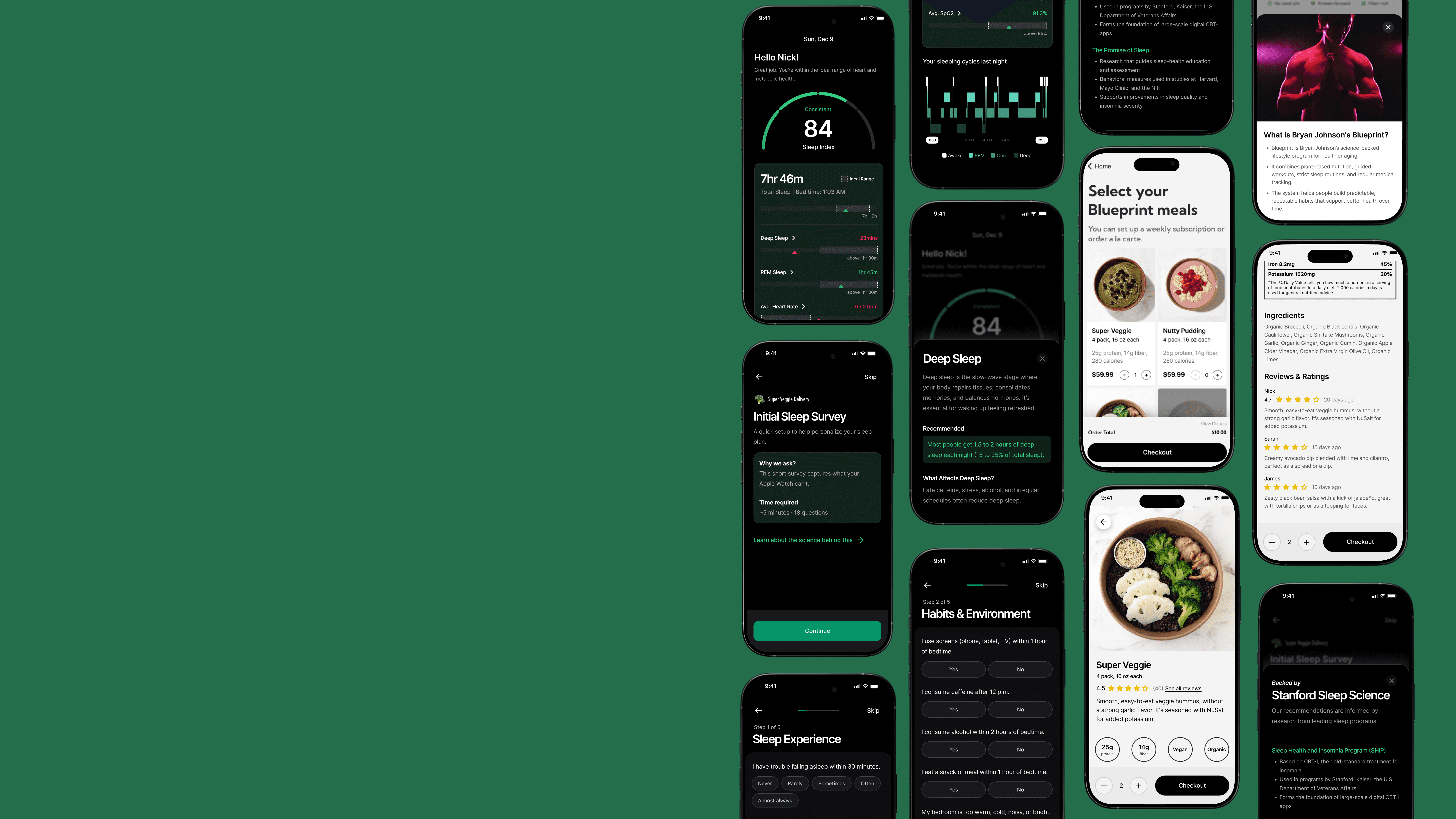
This case study focuses on improving the usability of Superveggie’s newly introduced Sleep feature while also evaluating how users browse and select meals. Through moderated usability testing with Apple Watch users, we identified key friction points that prevented users from fully understanding their sleep data and confidently making meal decisions, and offered relevant design recommendations to address these gaps.
The Problem
The Problem
Super Veggie offers powerful sleep and nutrition tools, but users struggle to understand and act on them due to high cognitive load, unclear context, and limited visibility of key information. As a result, both new and returning users face friction during onboarding, sleep interpretation, and meal decision-making.
Our aim was to uncover opportunities that make each feature feel clear, intuitive, and simple to use on its own.
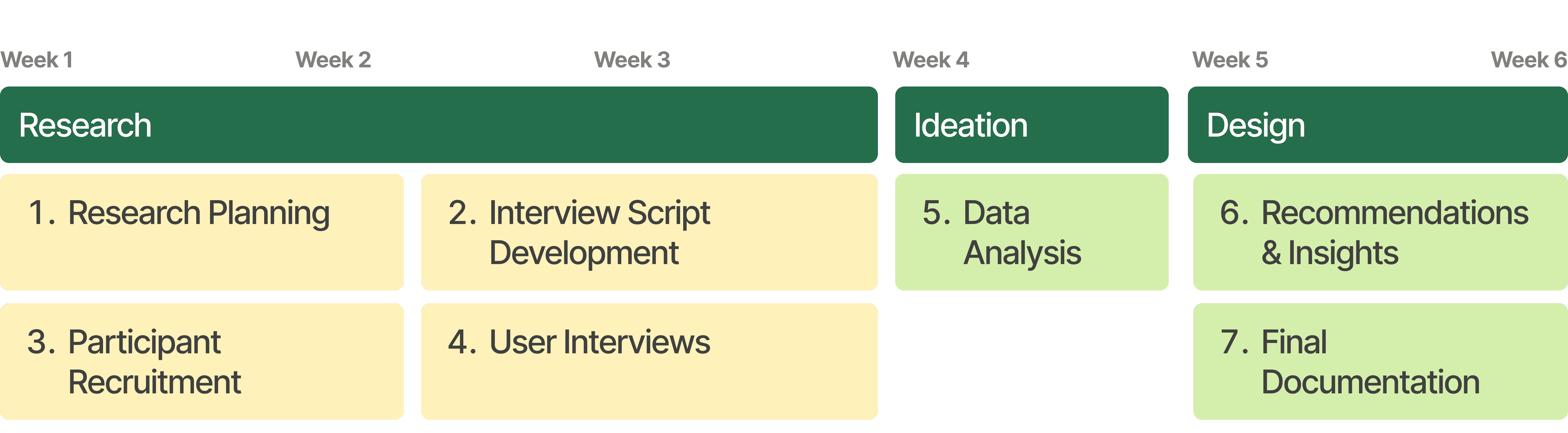
Project Timeline
Project Timeline
Research Goals
Research Goals
GOAL 1
Assess how easily users can connect to and interpret the Sleep feature.
GOAL 2
Evaluate the clarity, effort, and usefulness of the onboarding sleep survey.
GOAL 3
Understand users’ mental models and comprehension of sleep analytics.
GOAL 4
Identify user expectations for actionable insights and lifestyle recommendations.
GOAL 5
Measure the ease of navigating and understanding the Eat feature.
GOAL 6
Determine overall satisfaction and how well the app aligns with user needs and behaviors.
User Testing
User Testing
Methodology
Conducted moderated remote usability testing to evaluate the Sleep and Eat features of the Superveggie app, with a primary focus on the newly introduced Sleep experience. Because the Sleep feature pulls data directly from Apple Health, the study was limited to Apple Watch users to ensure all testing reflected real, personal sleep data rather than simulated content.
8 moderated remote sessions
45- 60 mins each session
2 interviews scripts
Task-based +
think-aloud method
Participants
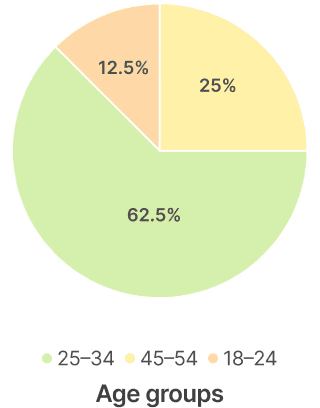
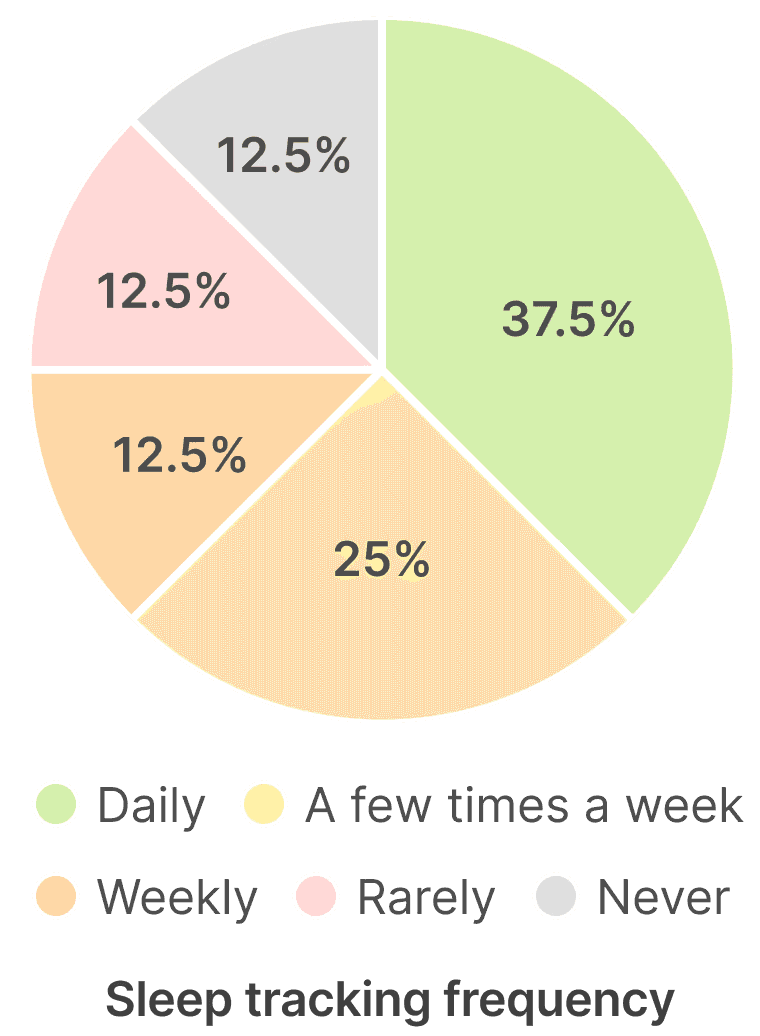
8 participants were drawn from two distinct sources:
Existing Users (Provided by Client)
Participants had already interacted with earlier app versions, enabling us to evaluate how well they interpreted new additions.
New Users (Screened and recruited via Private Panels)
Participants had no prior experience with Super Veggie, enabling us to capture first-time impressions
New recruited users were screened for:
Own and use an Apple Watch
Track (or have tracked) sleep using Apple Health
Active interest in improving health or daily habits
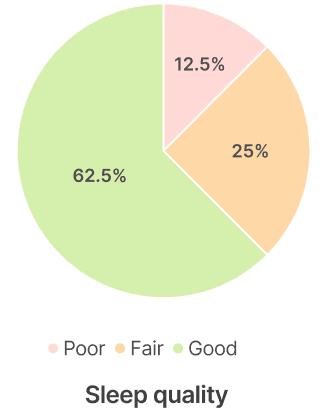
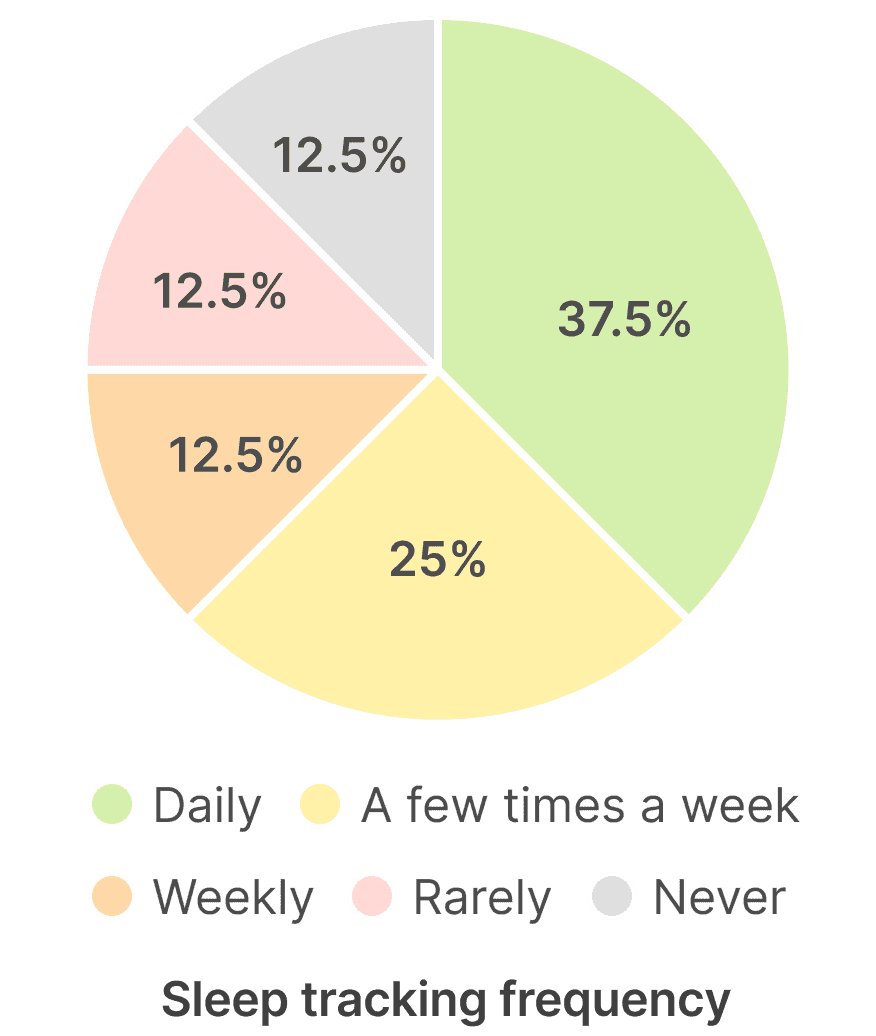
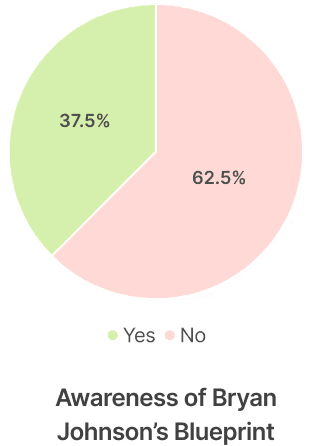
Procedure, Data Collection and Analysis
Each usability session was conducted by 2 researchers and one participant at a time. One researcher moderated the session, guiding the participant through tasks and follow-up questions, while the second researcher documented observations and timestamps.
The structure of each session included:
Pre-test Questionnaire
Task Completion
Post-task
Questionnaire
Data Organisation
& Analysis
We Collected:
Screen and audio recordings
Moderator notes
Questionnaire responses
Pre-test Questionnaire
Task Completion
Post-task
Questionnaire
Data Organisation
& Analysis
Findings & Recommendations
Findings & Recommendations
SLEEP
Finding 1:
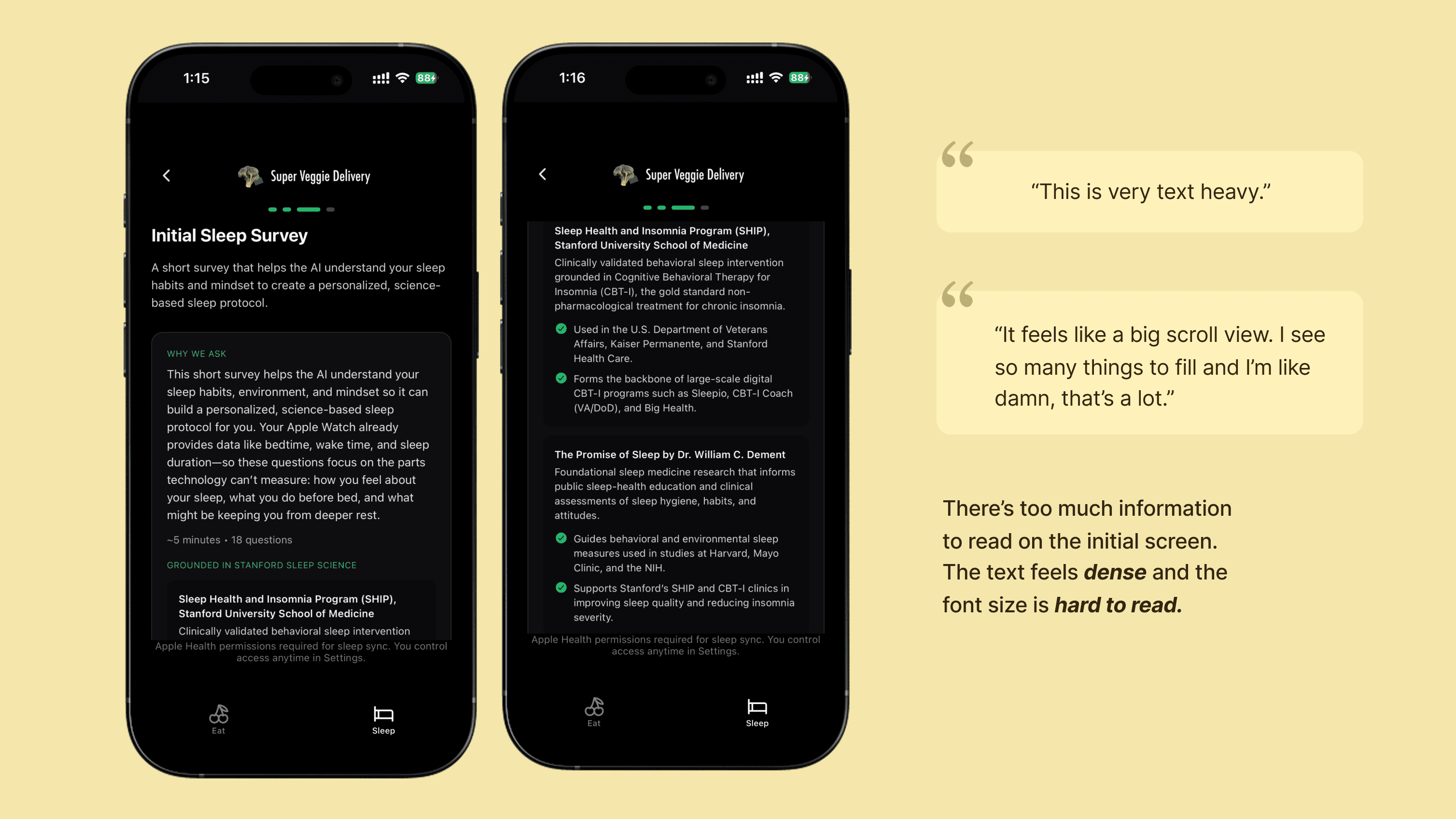
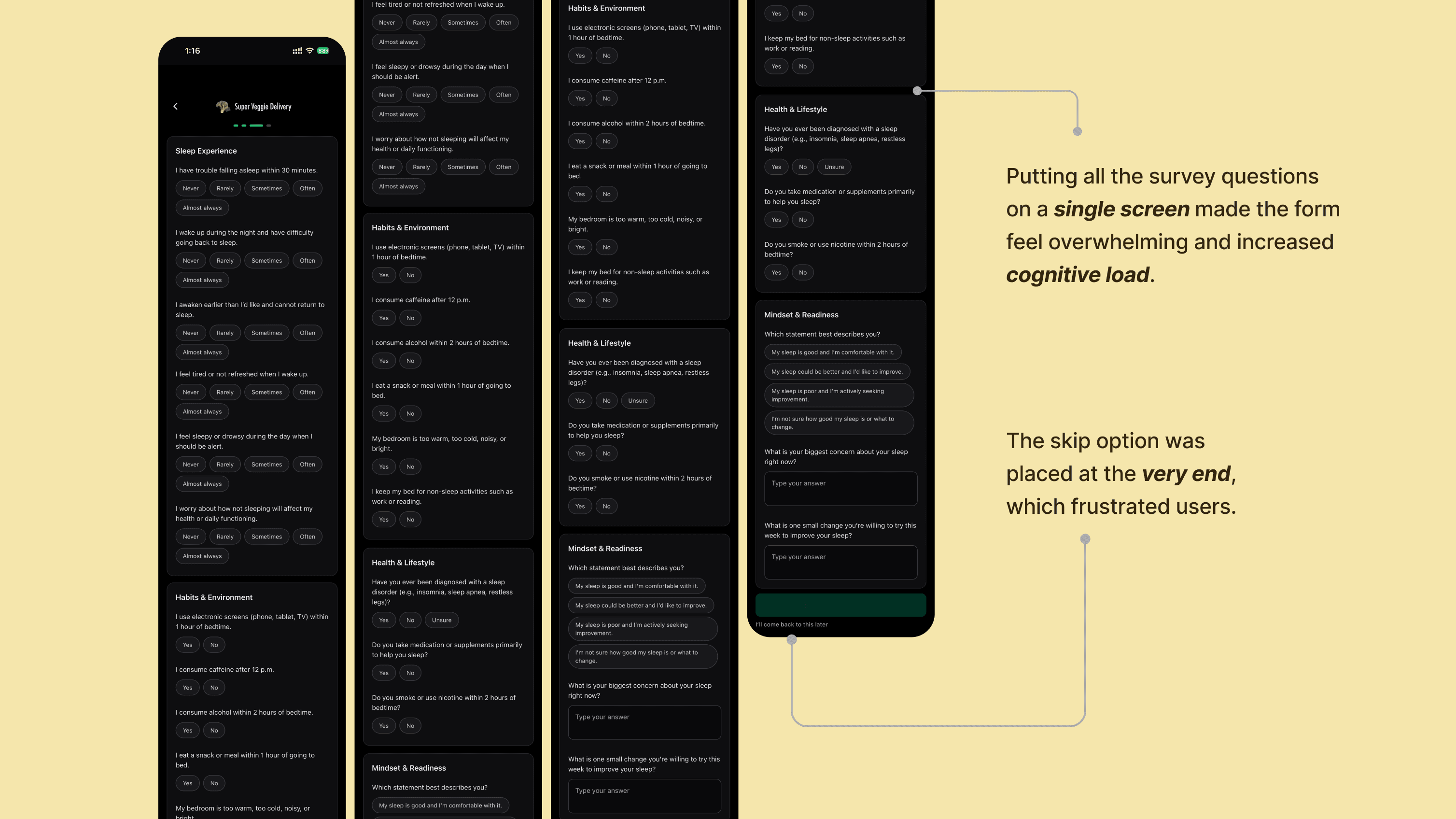
Overwhelming sleep on-boarding survey
Users described the sleep survey as overwhelming and mentally taxing. Open-ended questions, large blocks of text, and a hidden skip option made the experience feel longer than expected.
Recommendation 1:
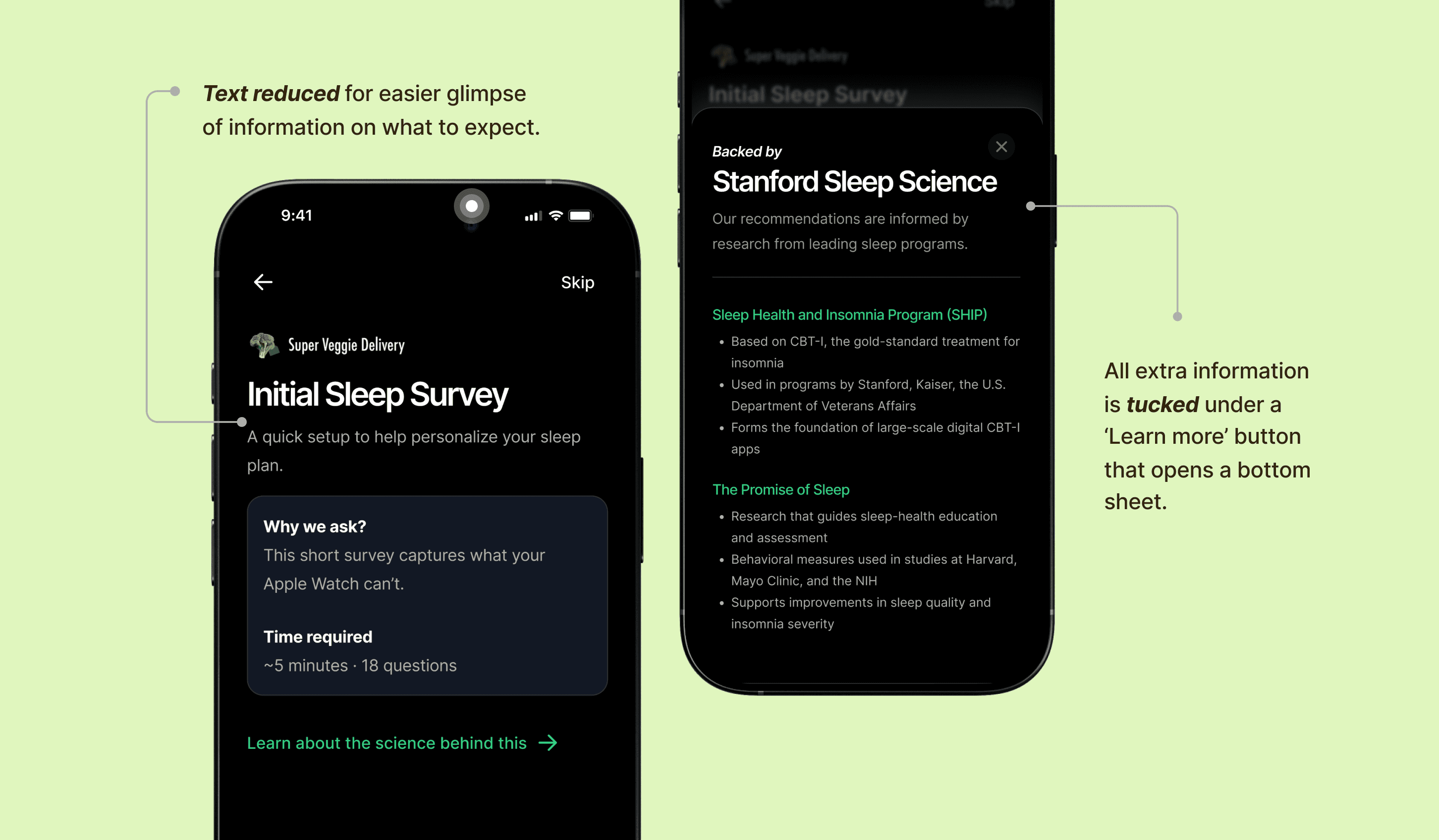
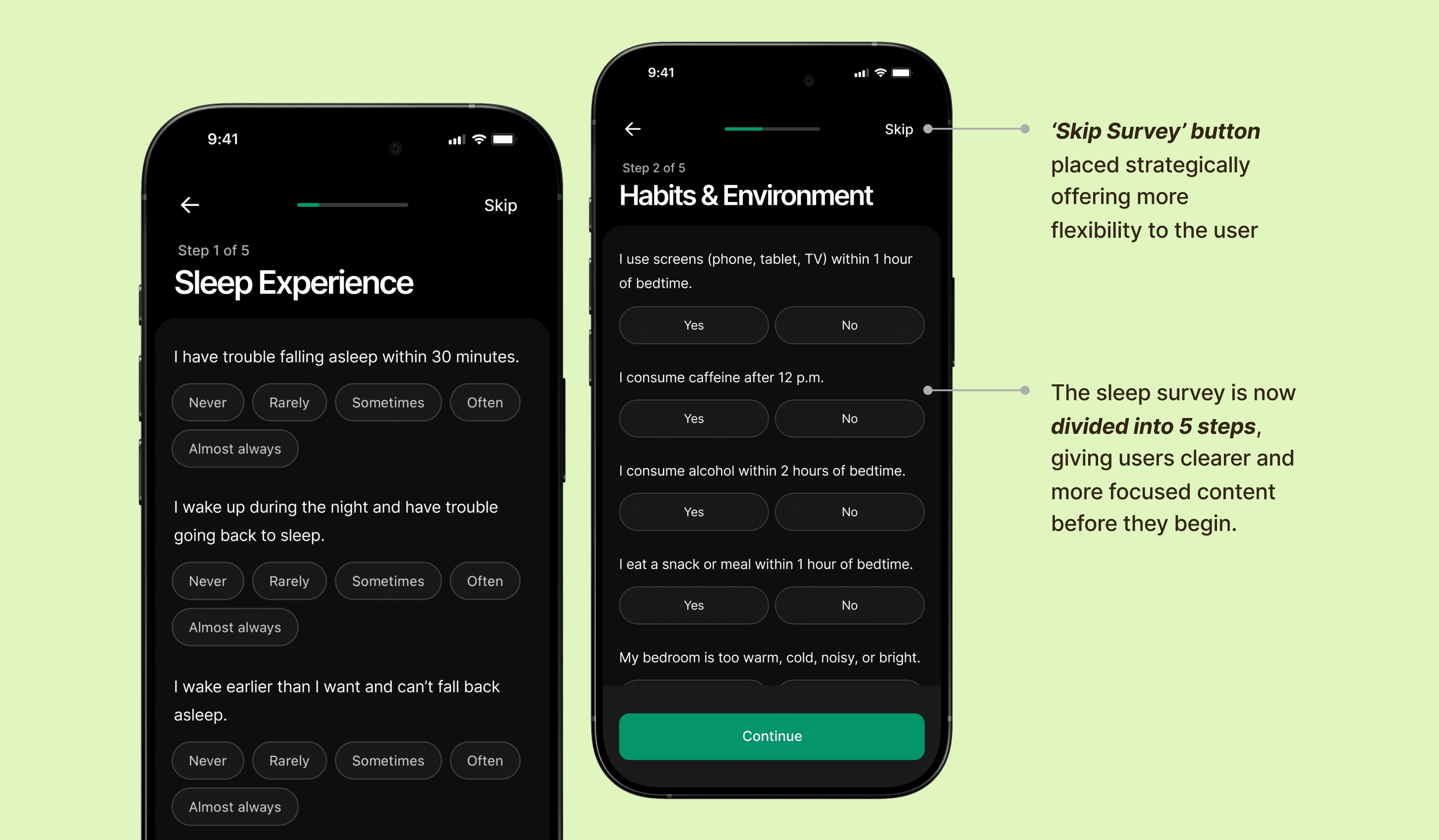
Create a more user-friendly, low-friction survey experience
Break the survey into shorter steps, reduce typing with structured inputs, and surface a visible skip option to lower effort, improve completion and prevent bounce offs.
Finding 2:
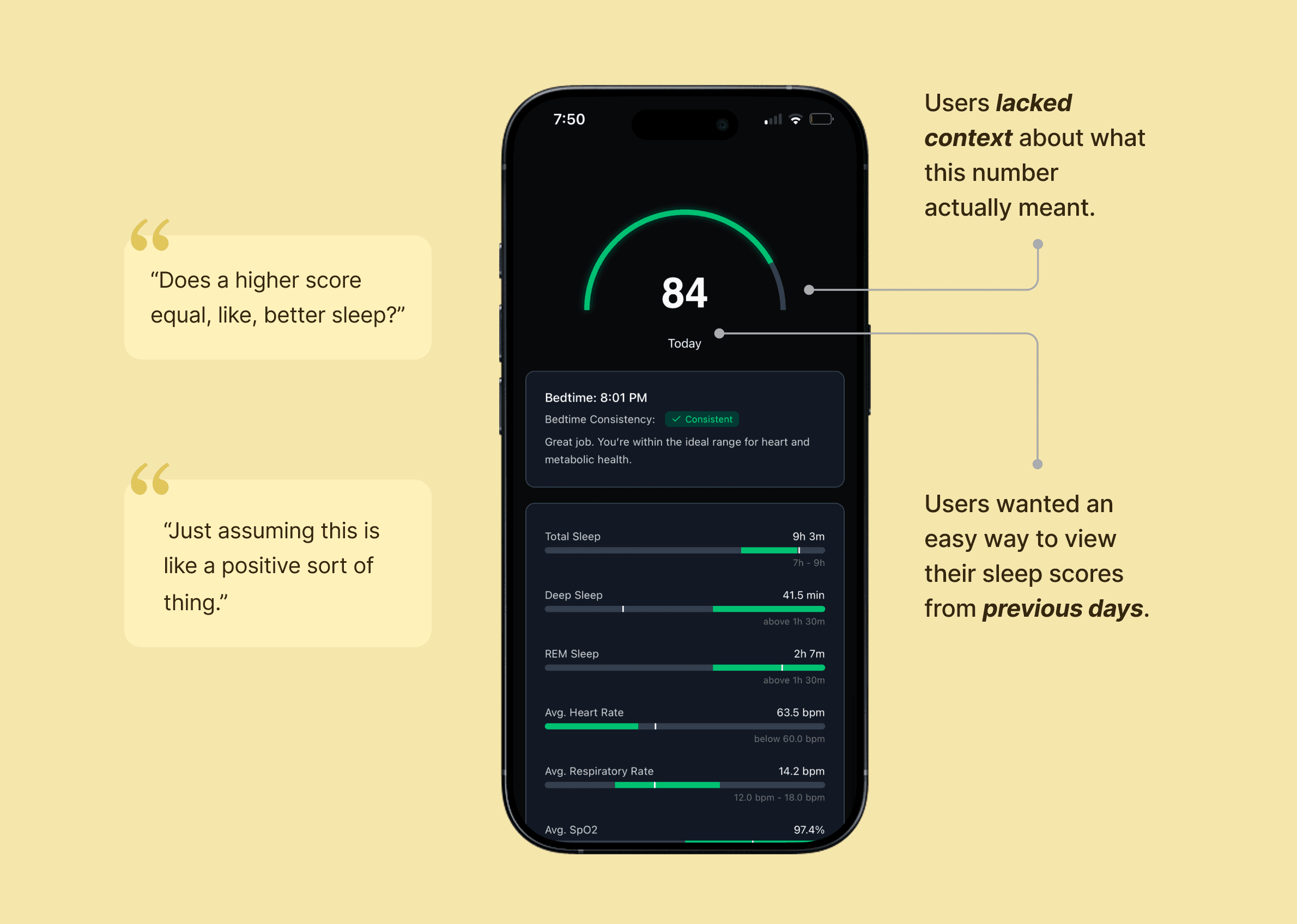
Sleep data is hard to interpret without context or visual clarity
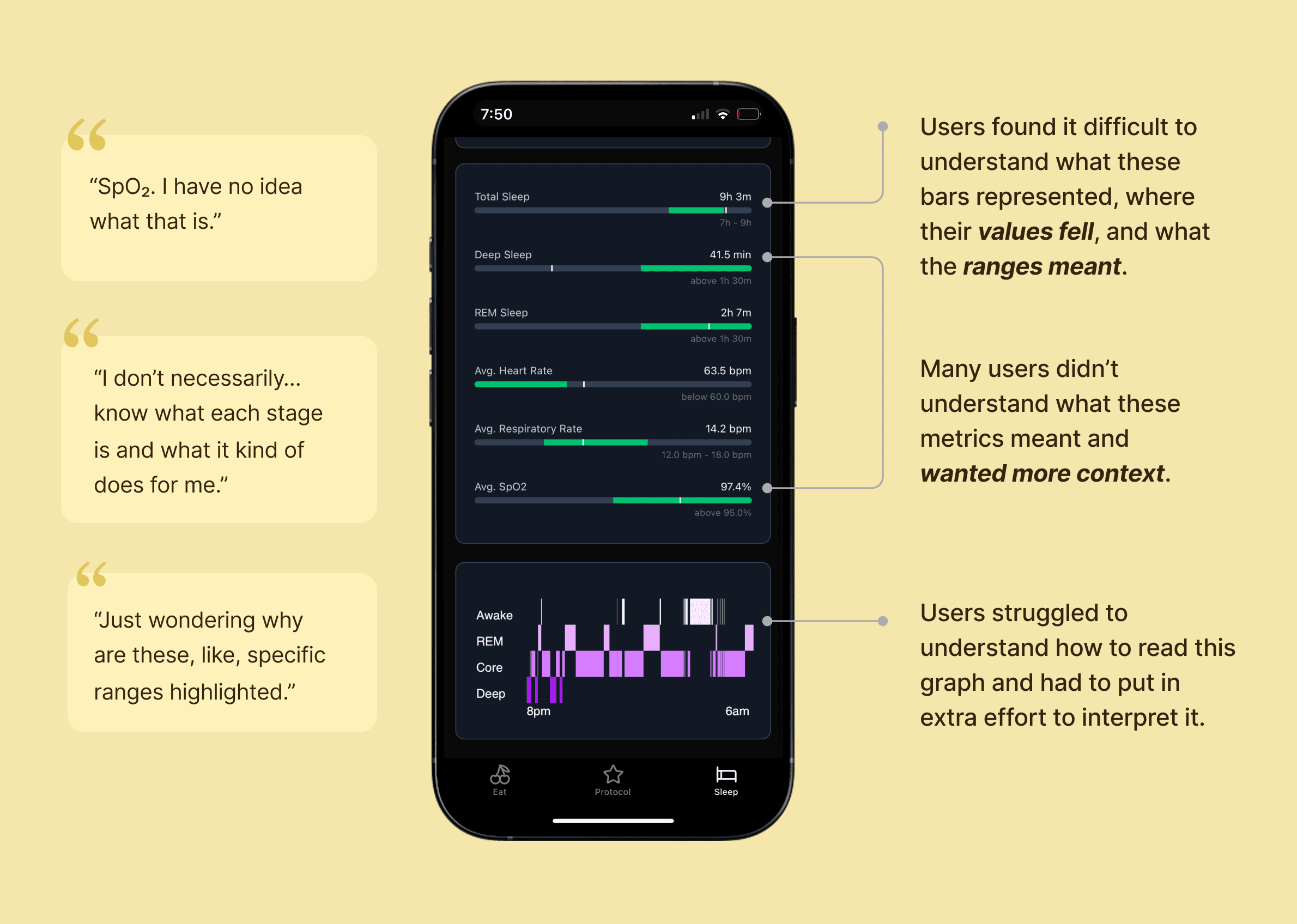
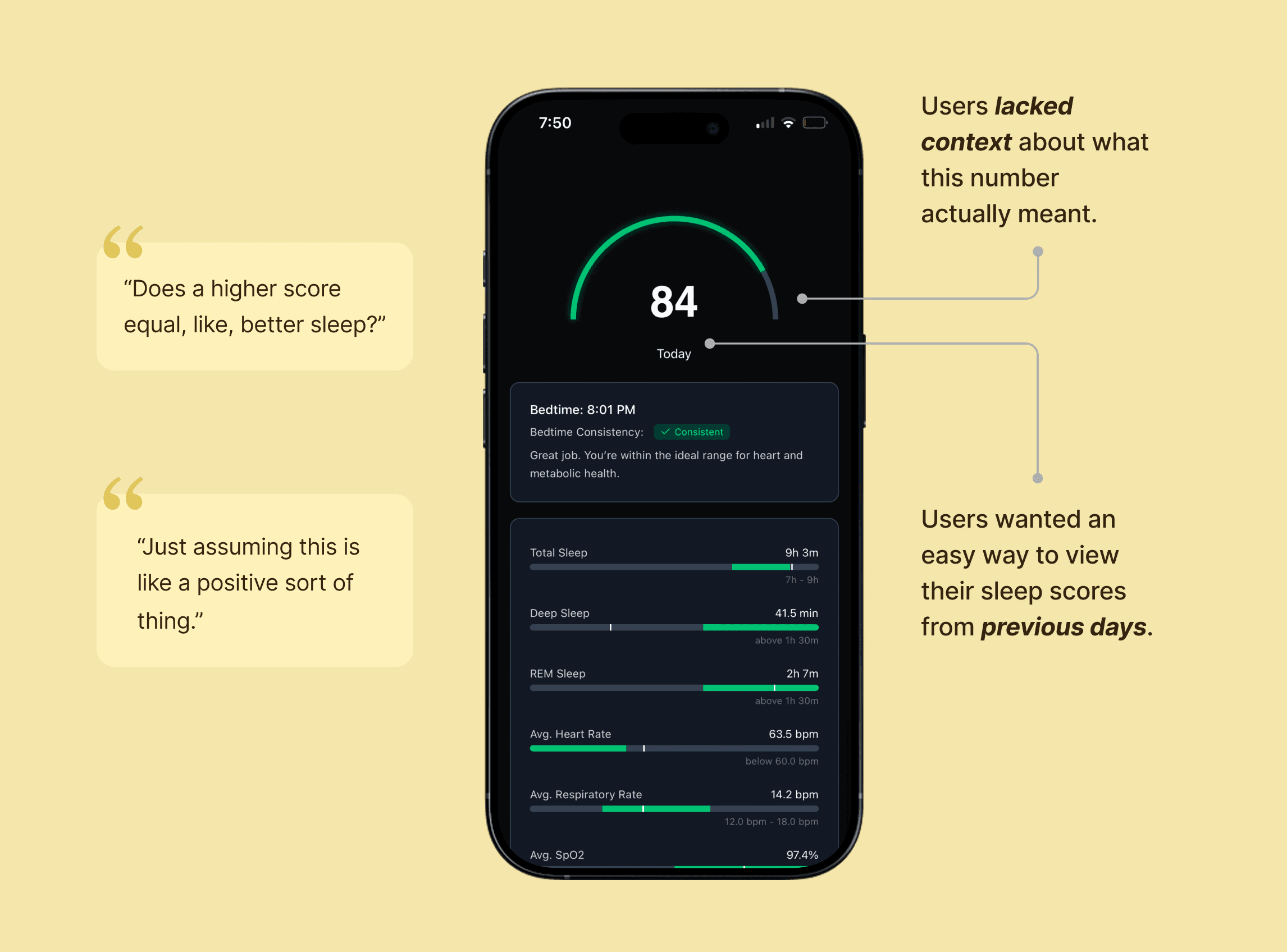
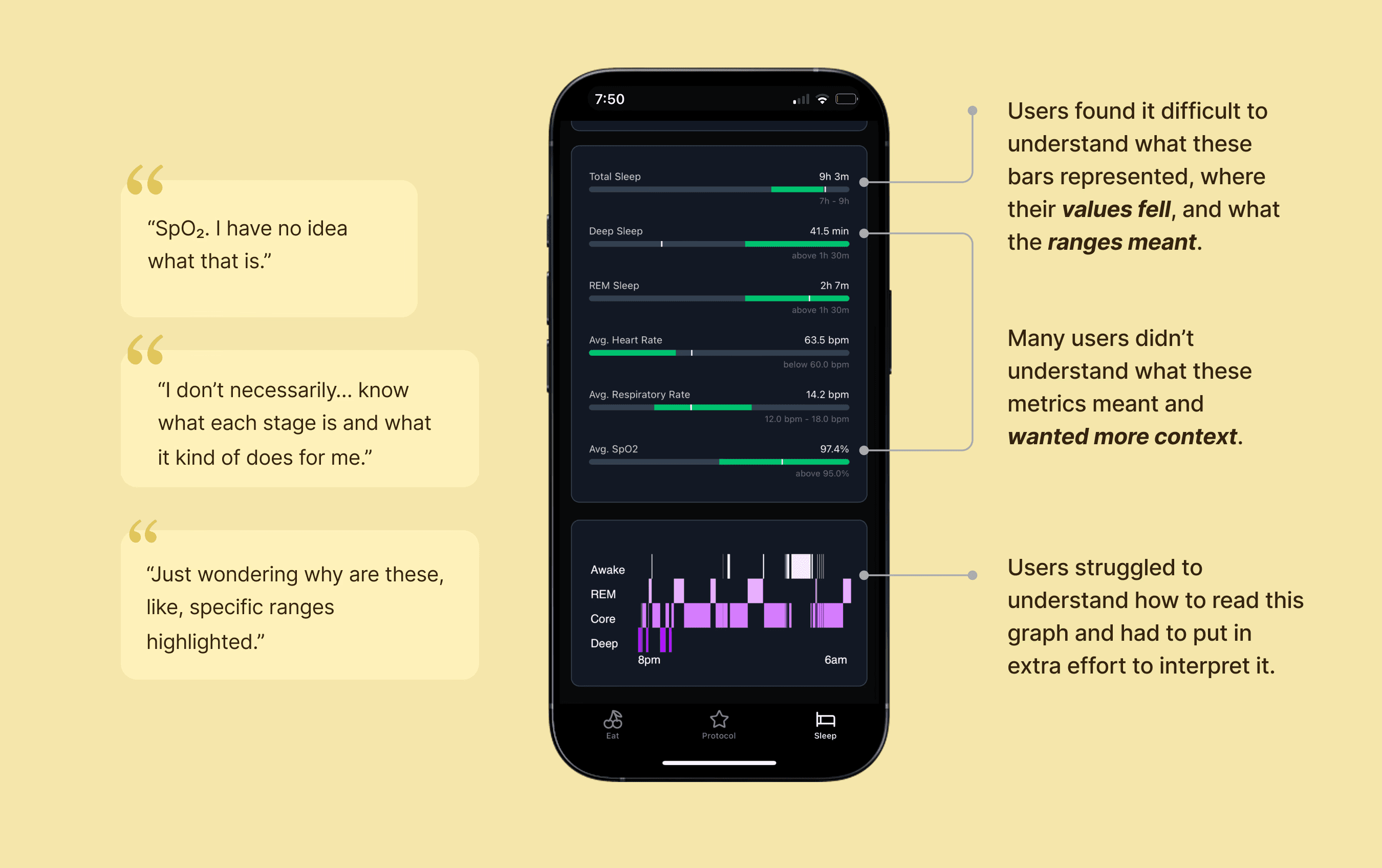
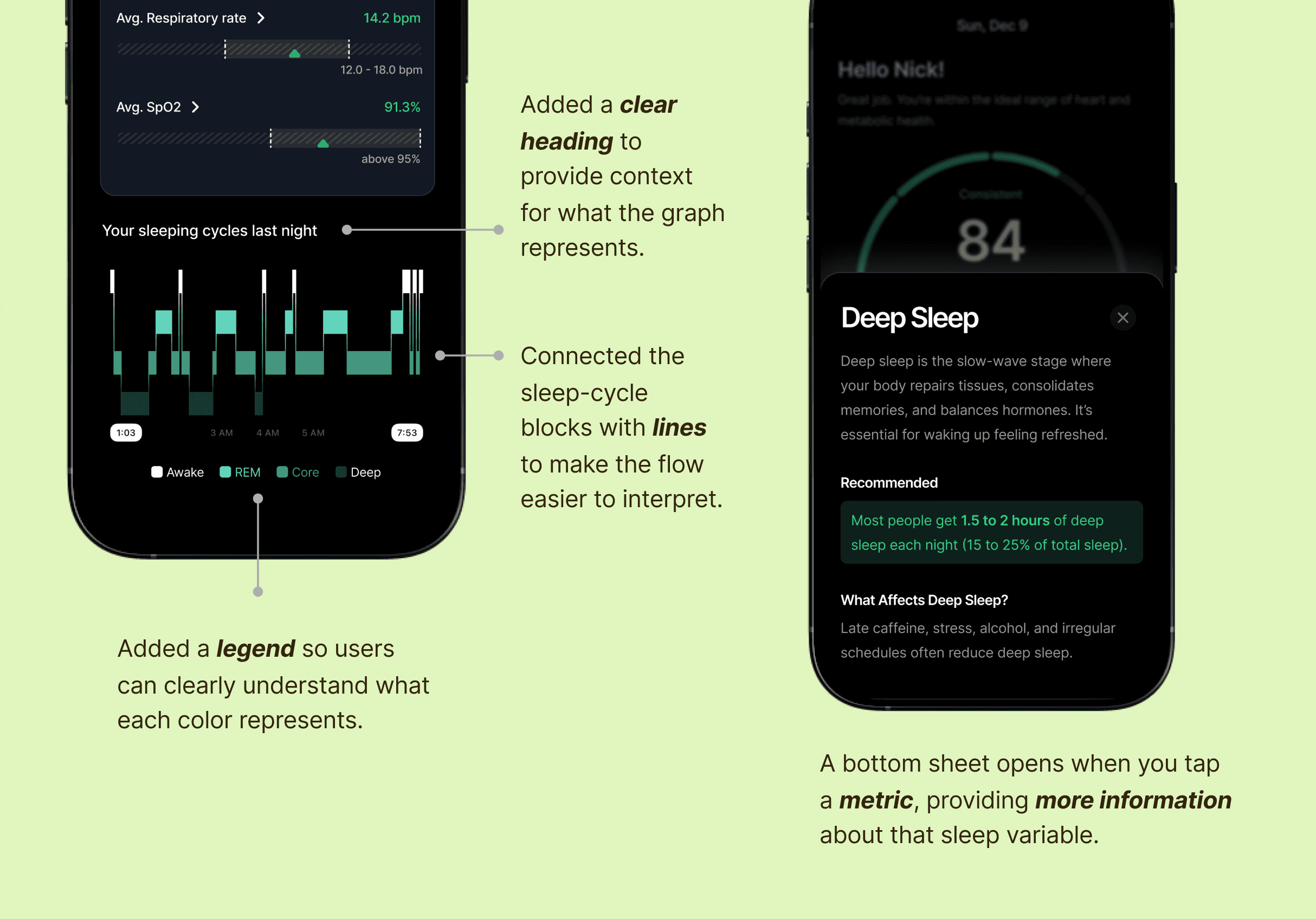
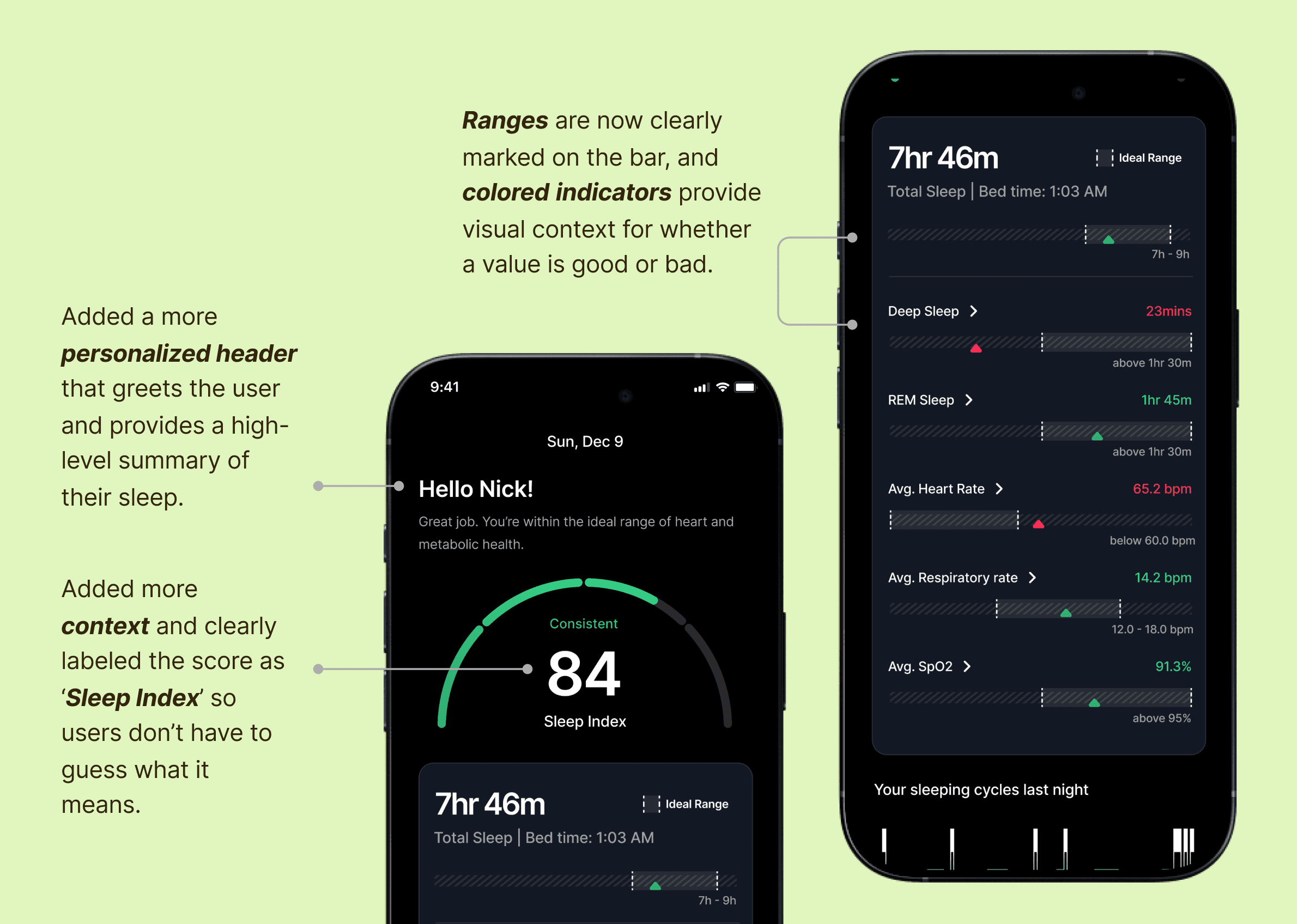
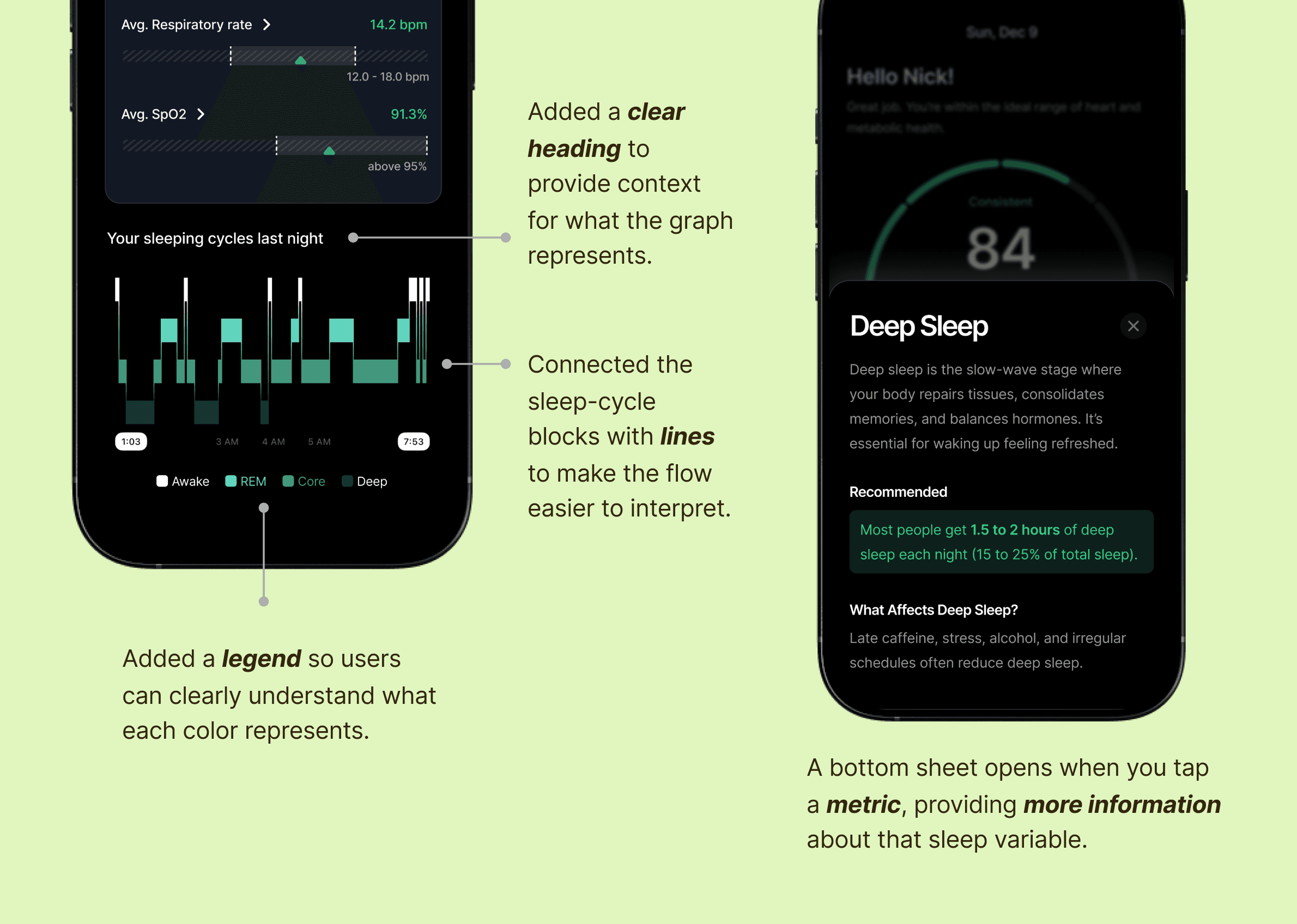
Users struggled to understand their sleep score, interpret individual sleep metrics like REM, Deep Sleep, SpO2, and correctly read visual indicators. The sleep graph felt visually disconnected.
Recommendation 2:
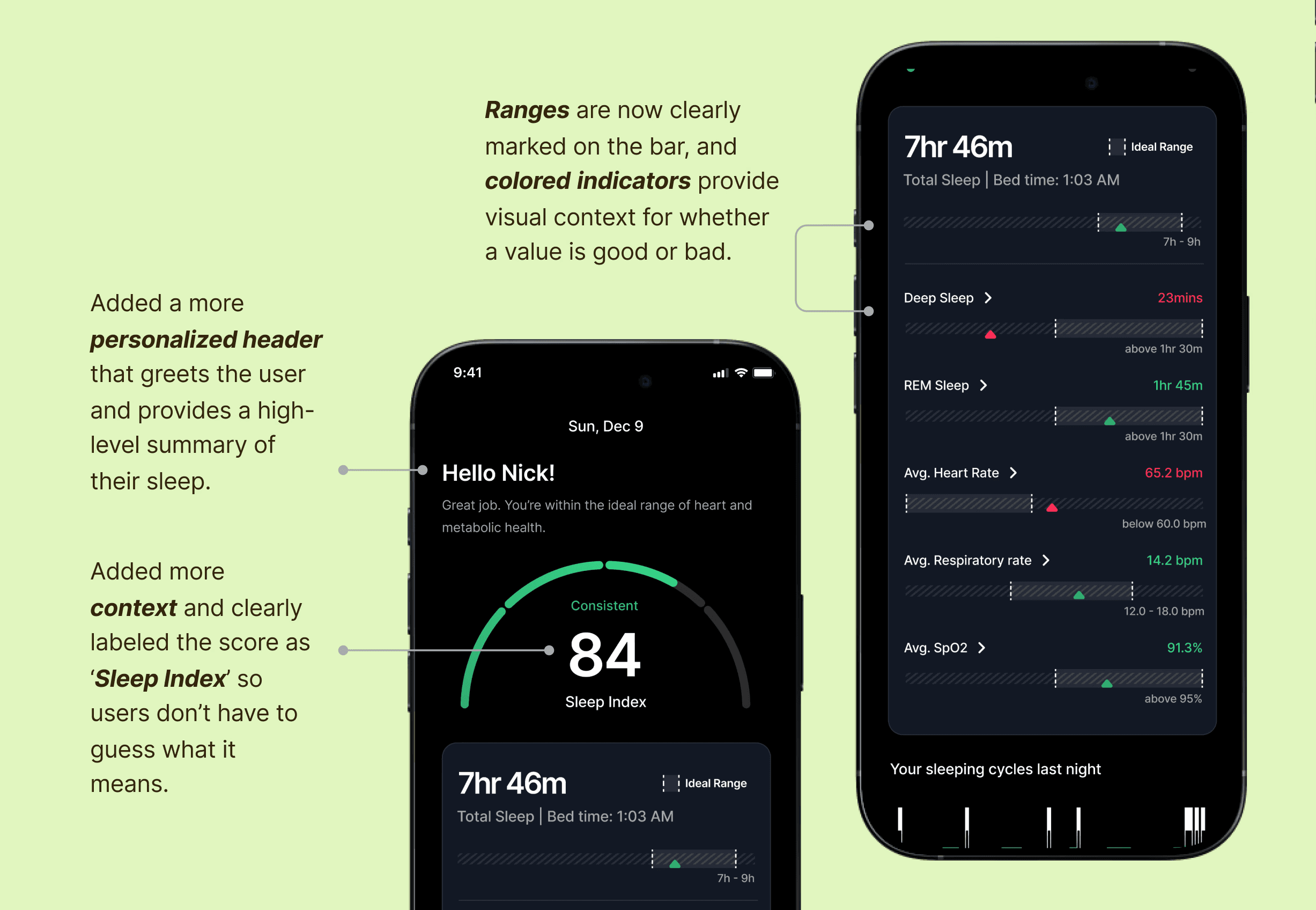
Clarify sleep insights through context and visual refinements
Provide immediate context through personalized messaging, add clear explanations for each sleep metric, refine visual indicators to clearly distinguish actual performance from ideal ranges and use a more connected and intuitive graph.
EAT
Finding 3:
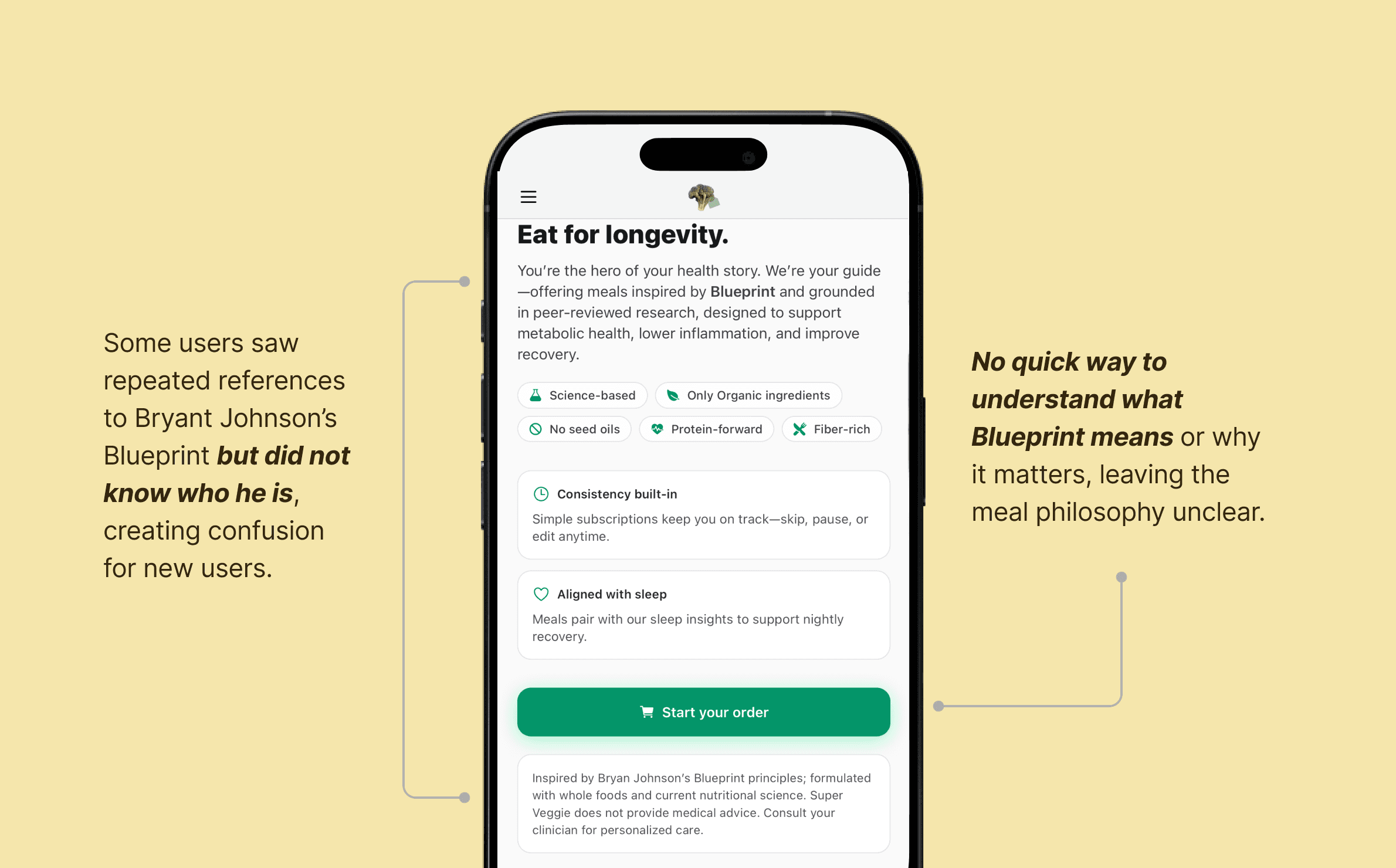
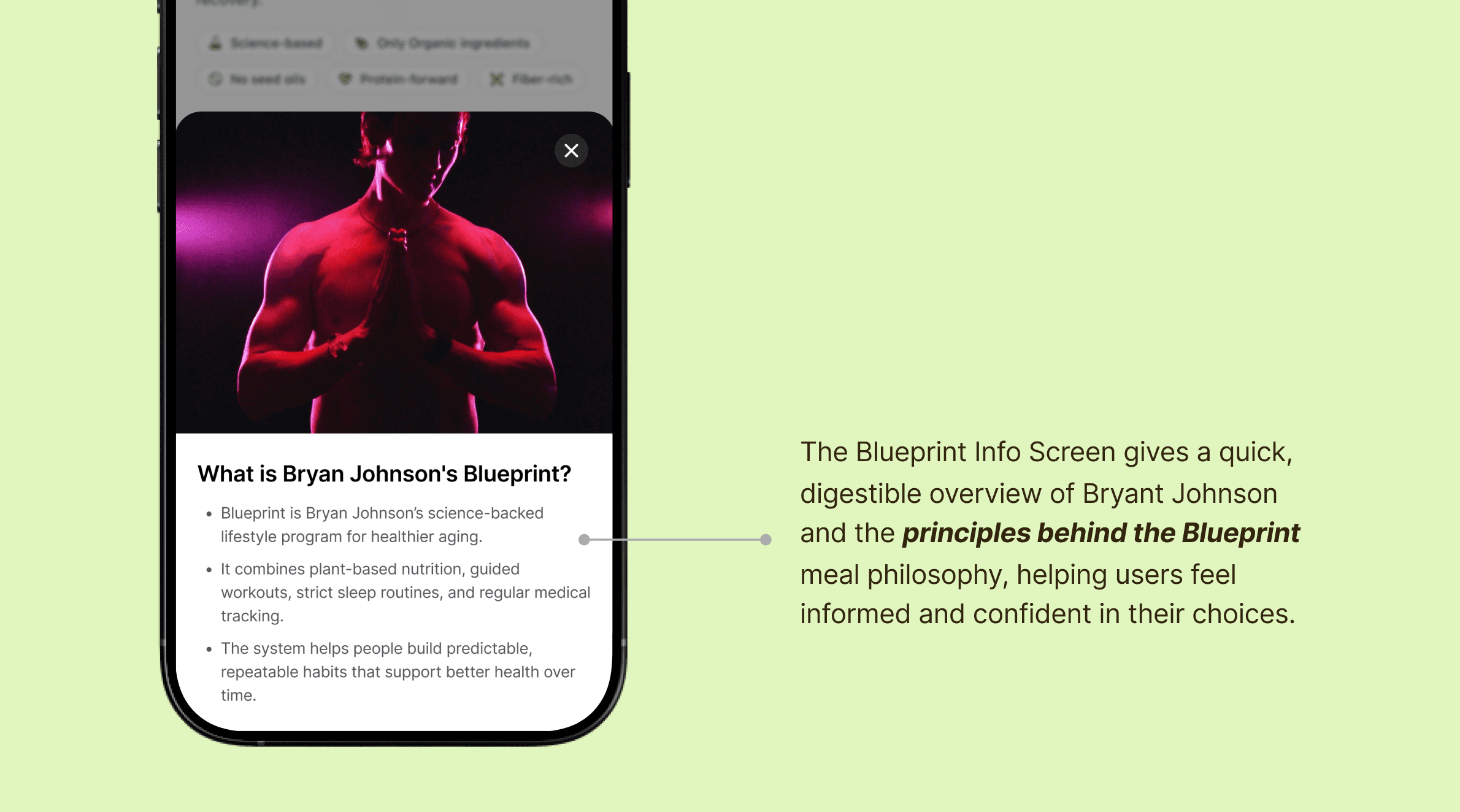
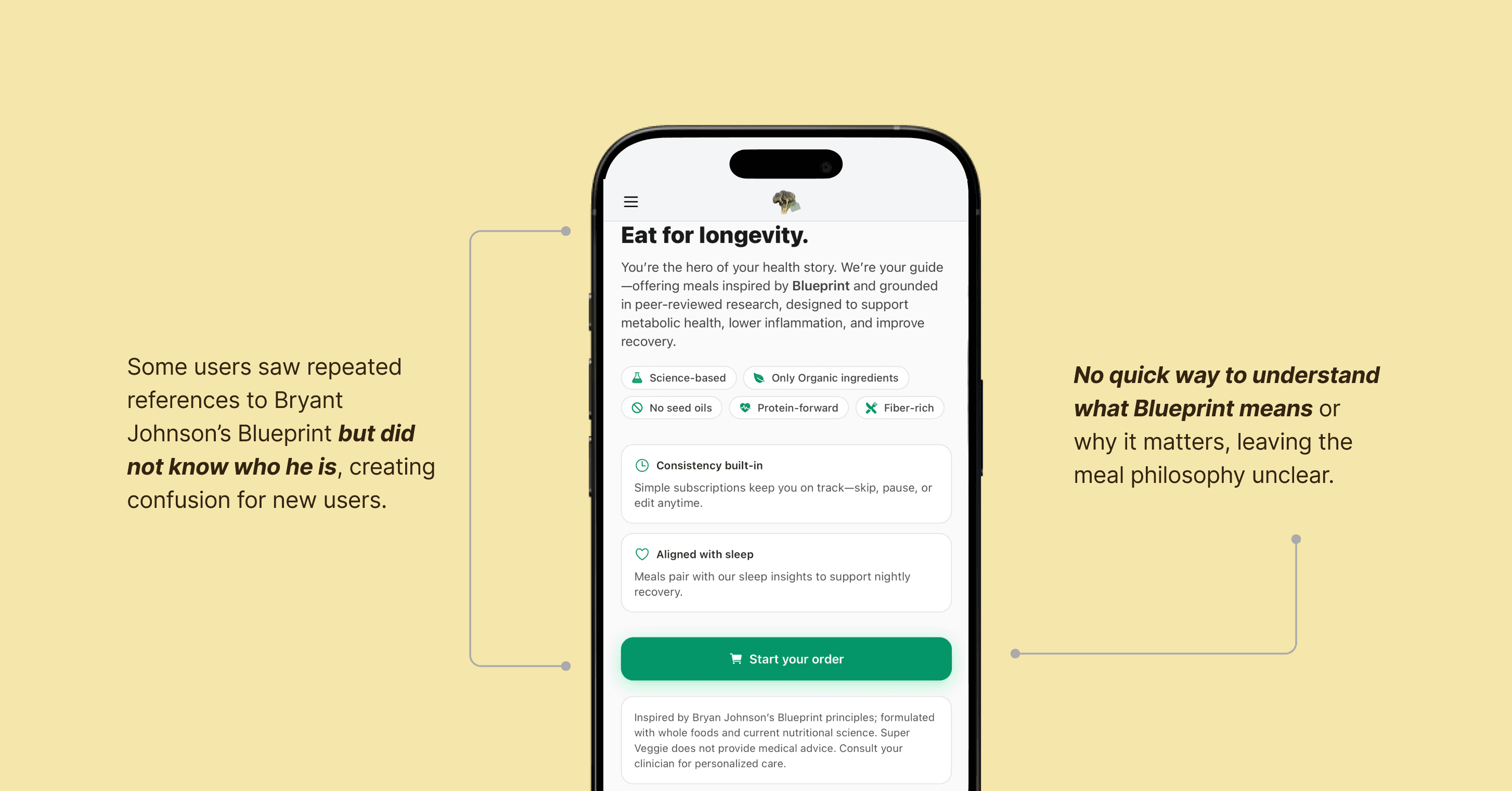
Blueprint Context Is Missing for New Users
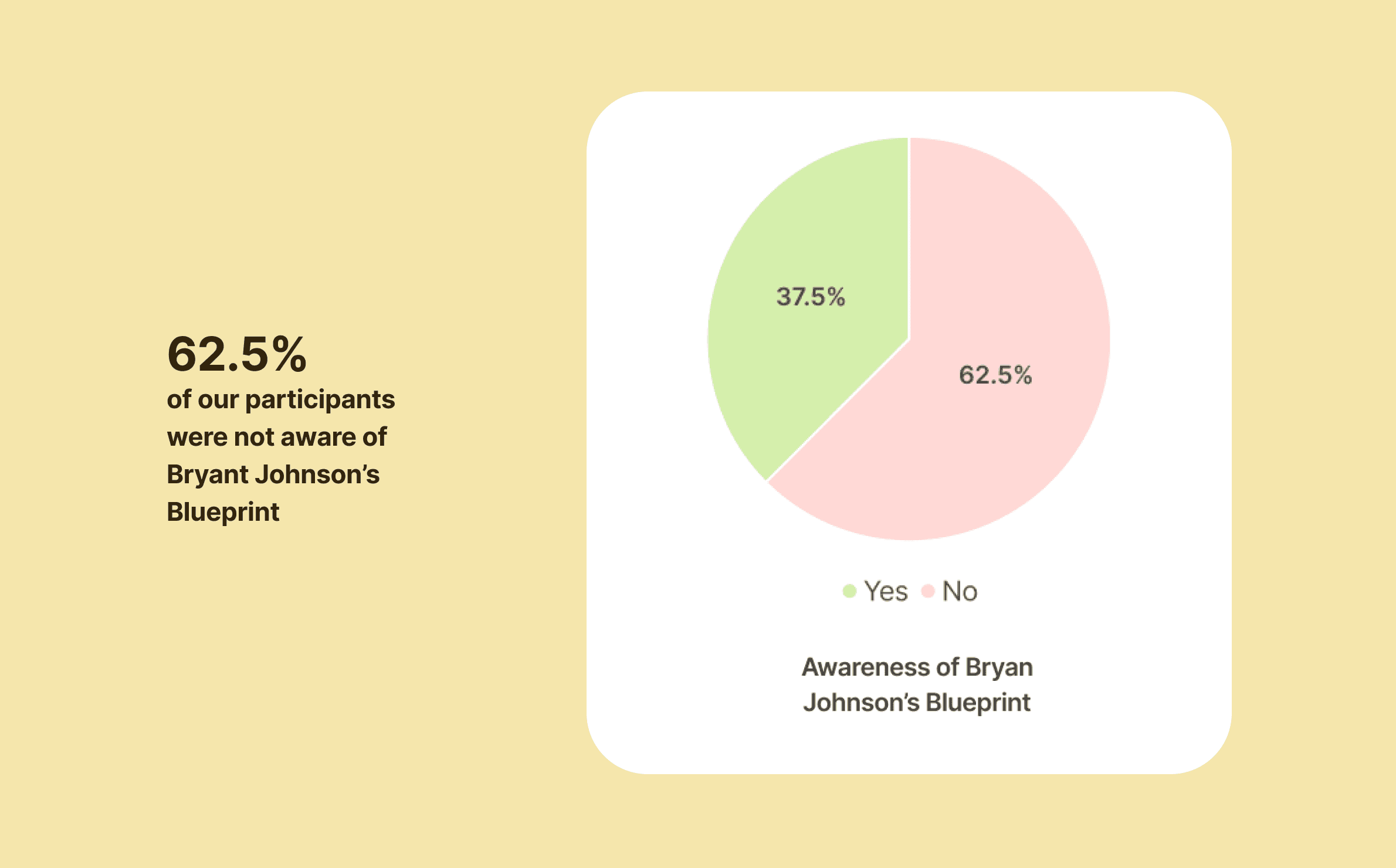
Non-Blueprint users lacked clarity on who Bryant Johnson is and how the protocol relates to their experience.
Recommendation 3:
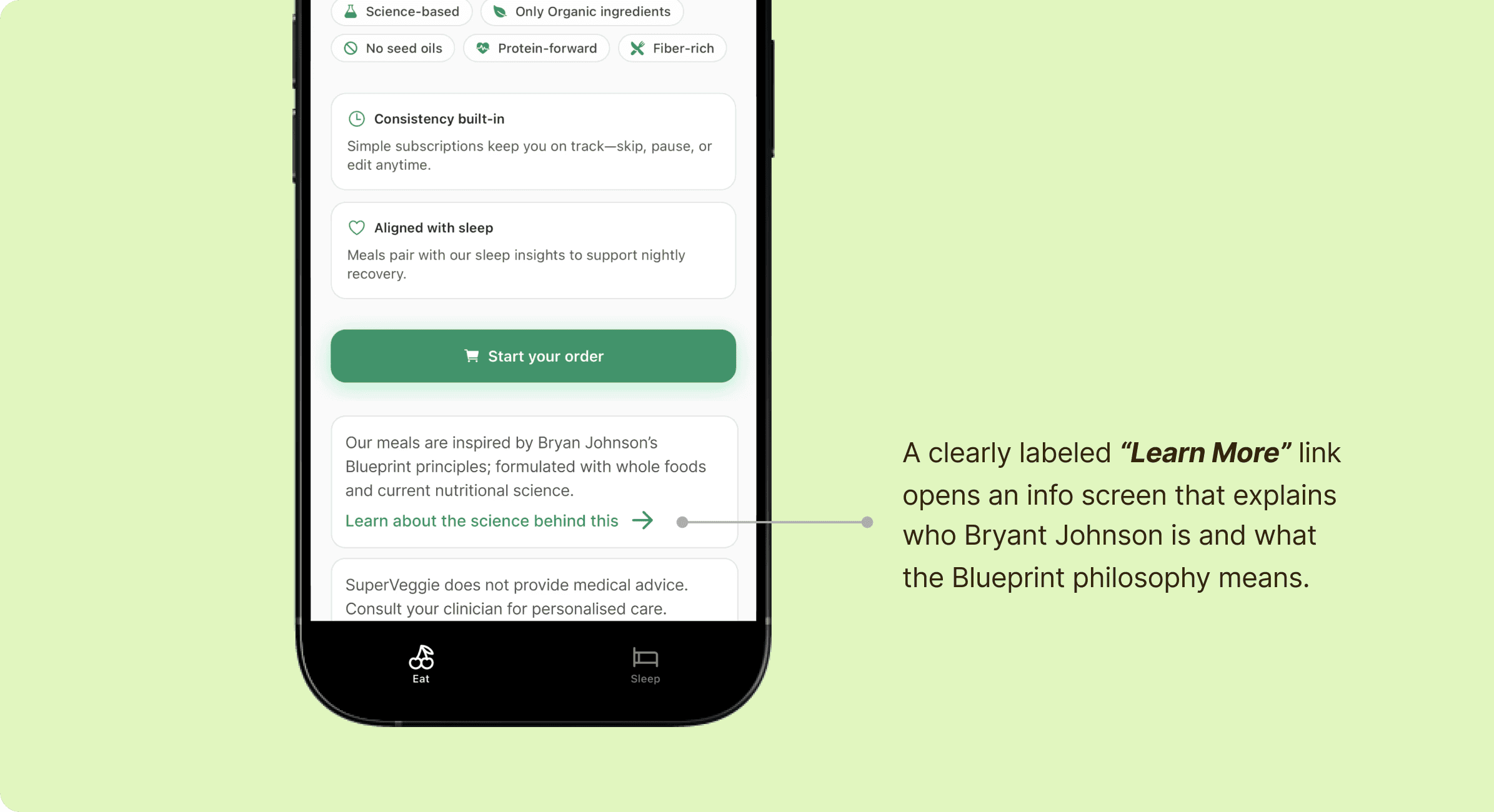
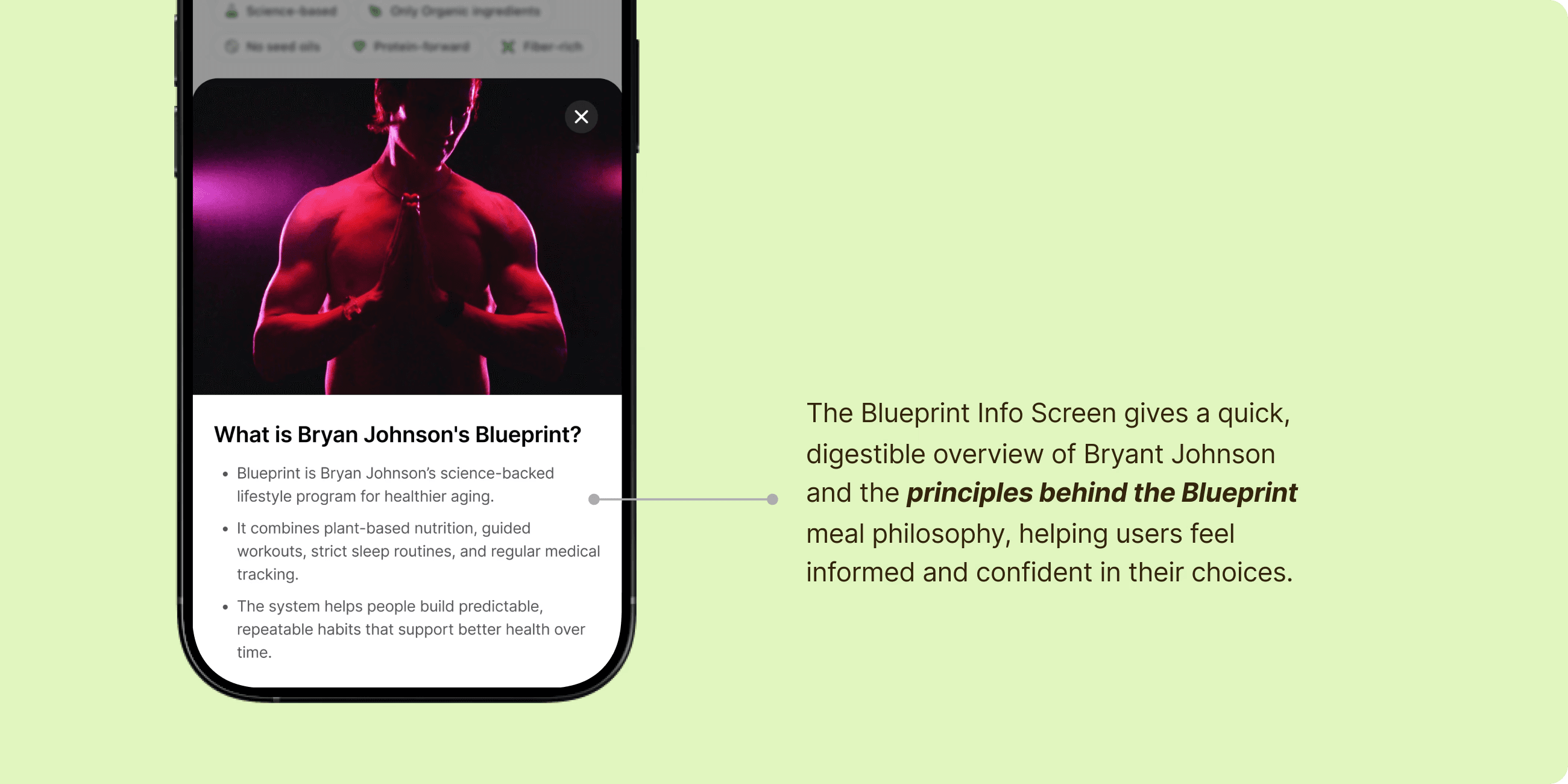
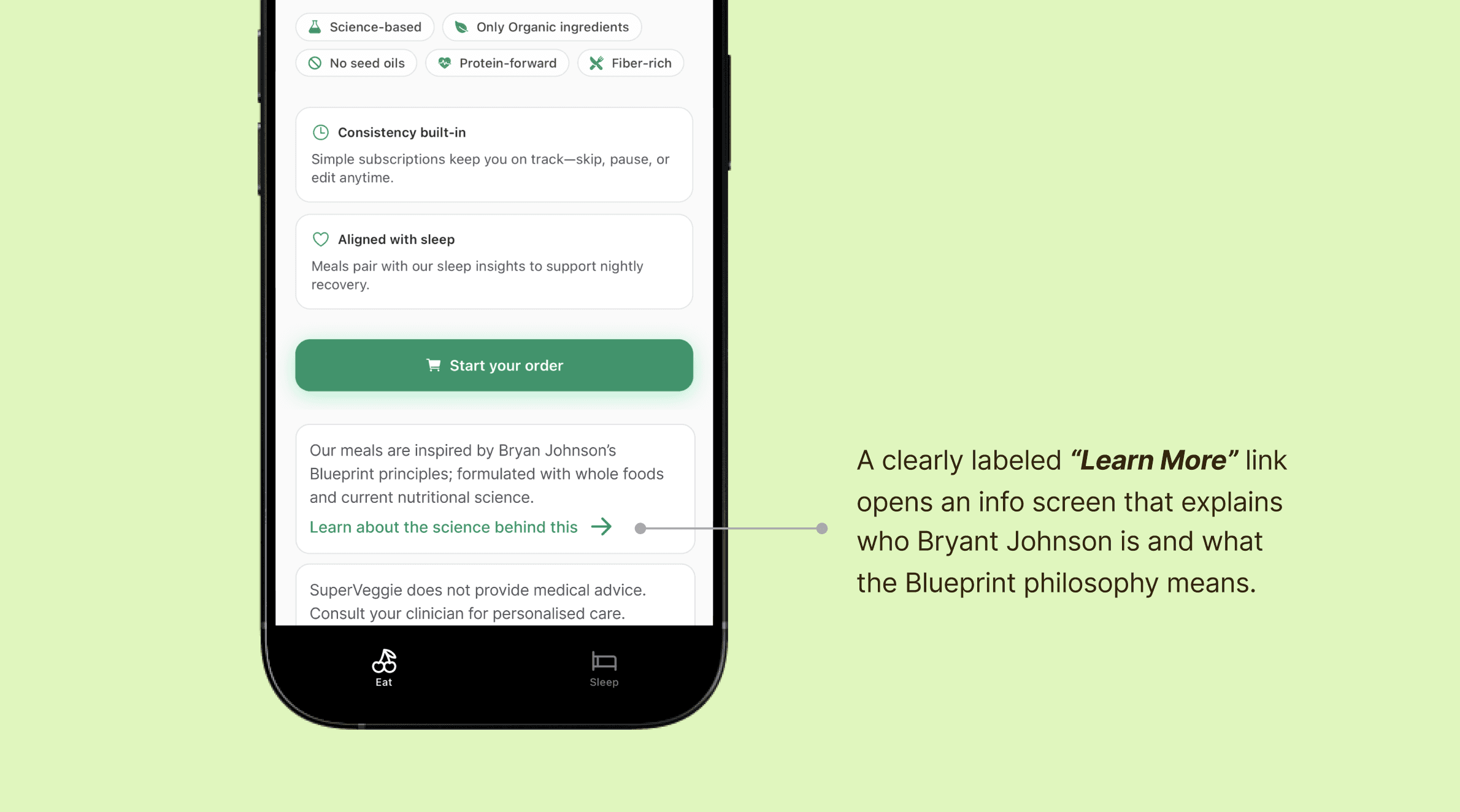
Provide a clear introduction to Bryant Johnson and “Blueprint” meals
Introduce lightweight Blueprint context during onboarding and relevant touchpoints to build understanding and trust.
Finding 4:
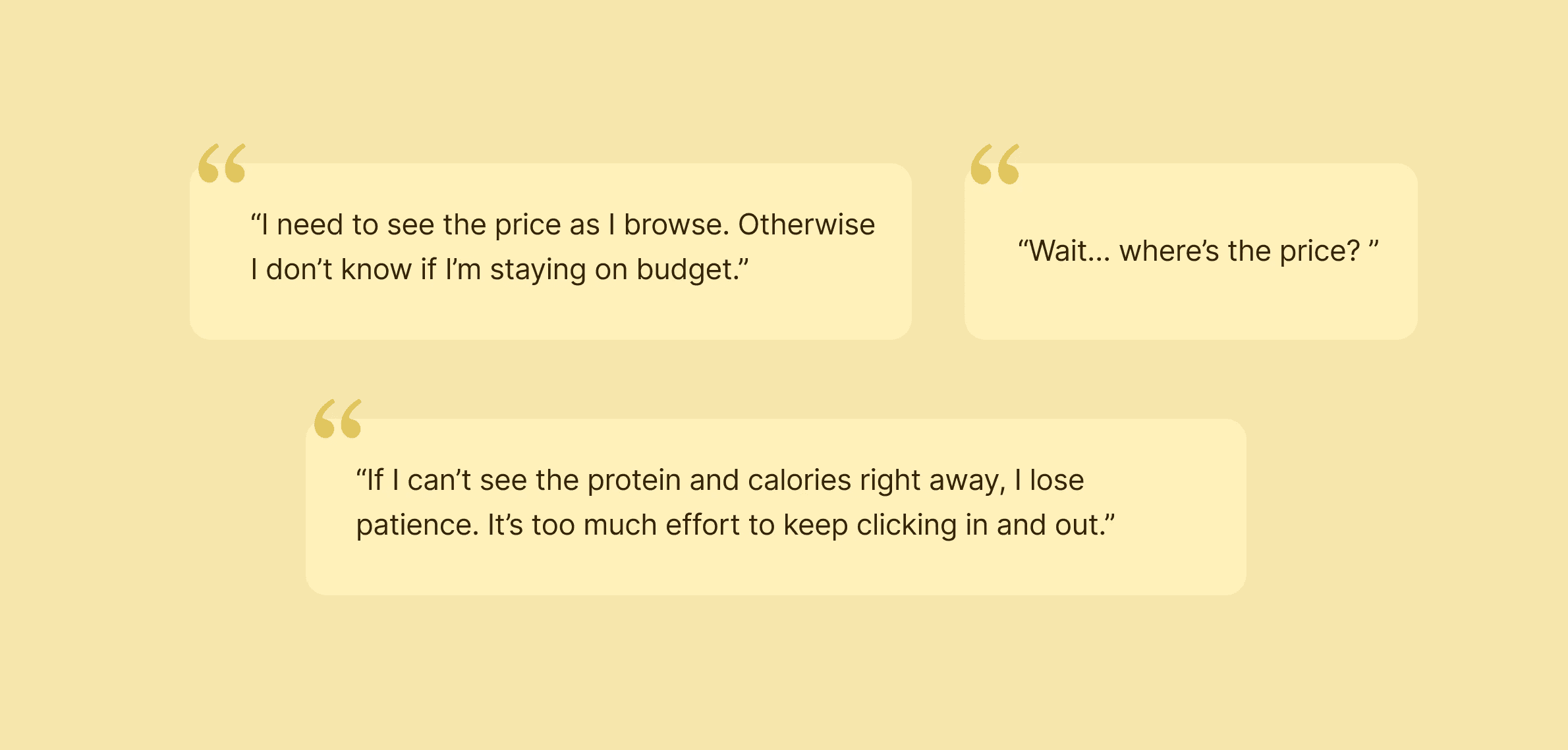
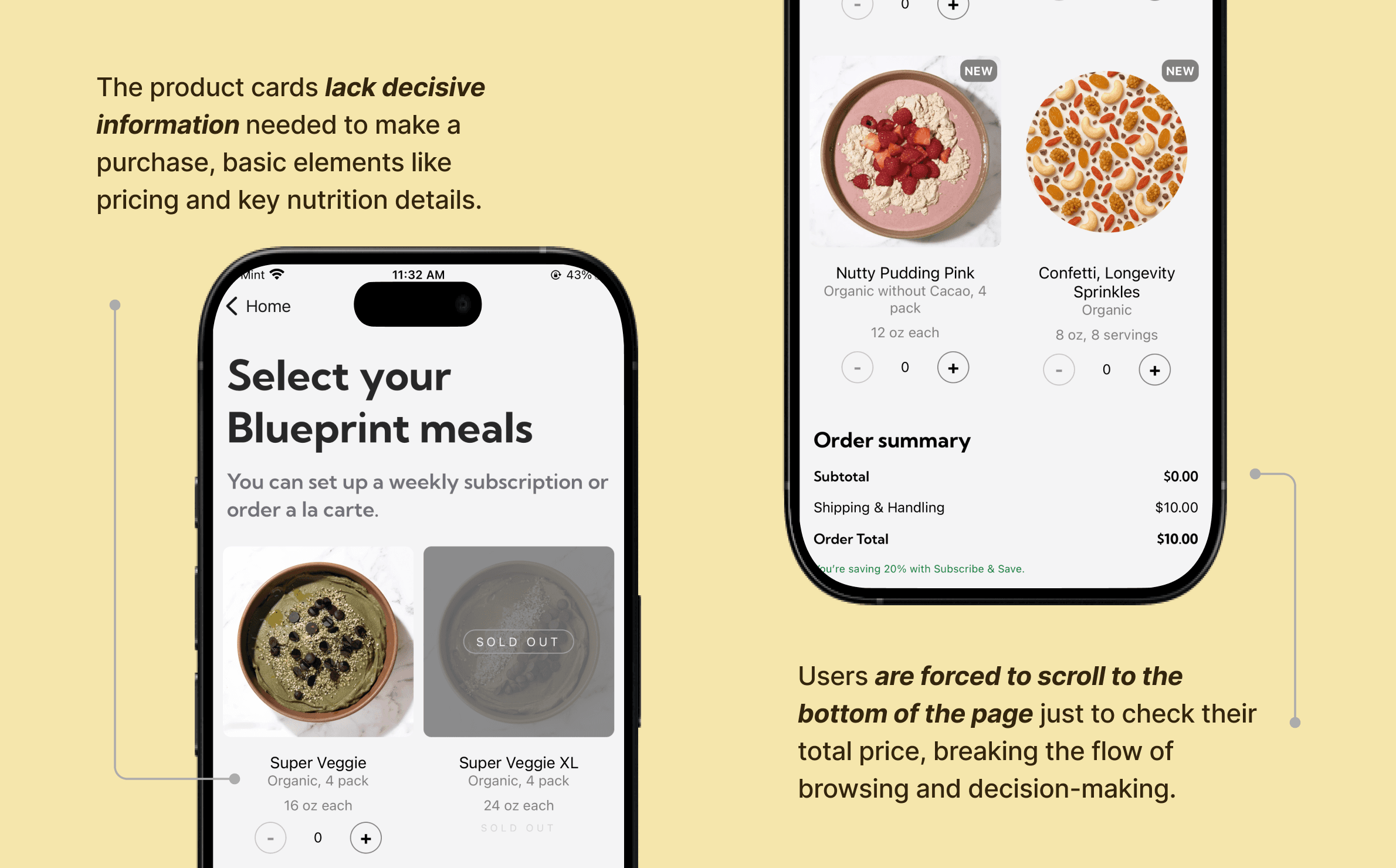
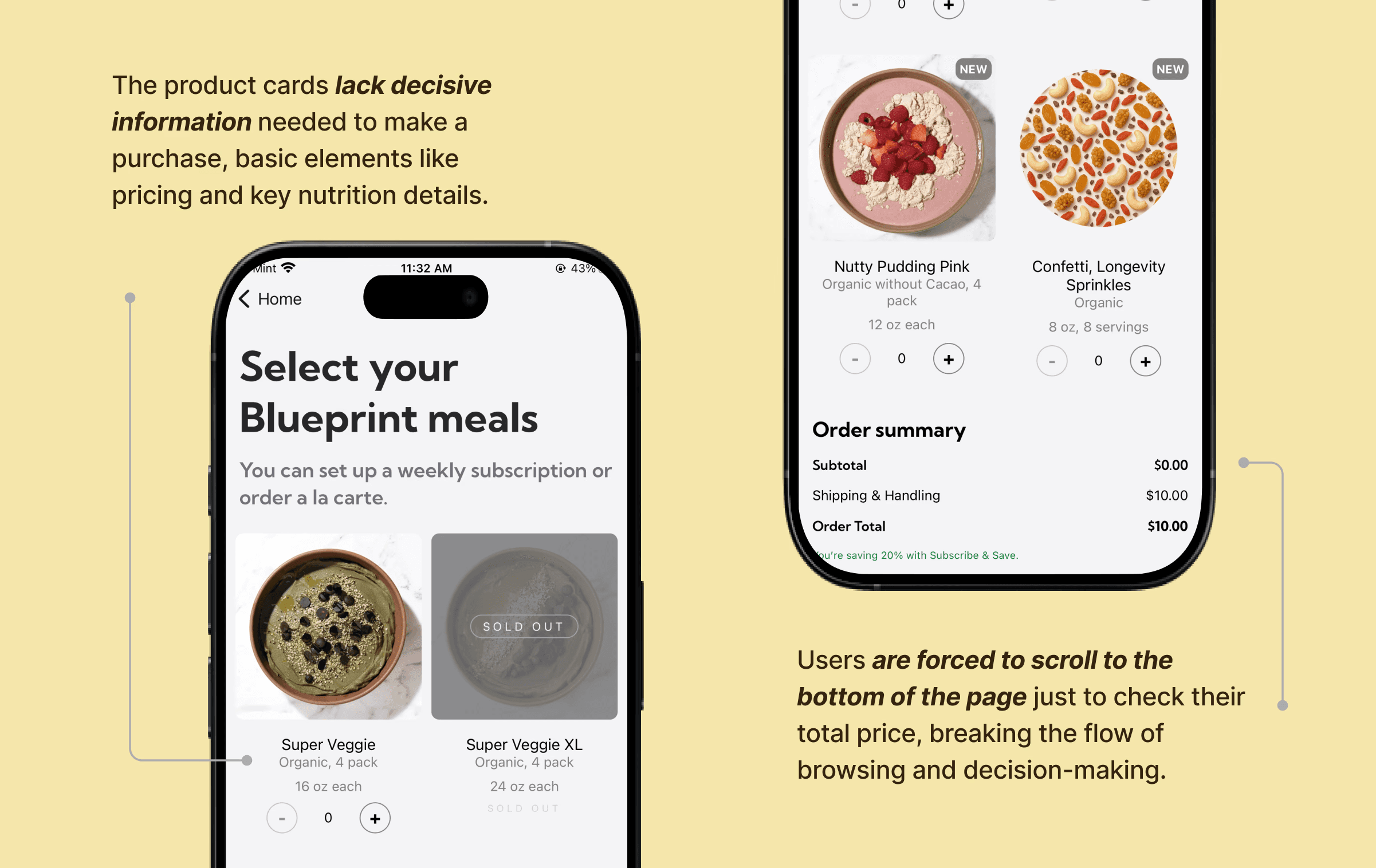
Key Nutrition and Pricing Information Is Hidden
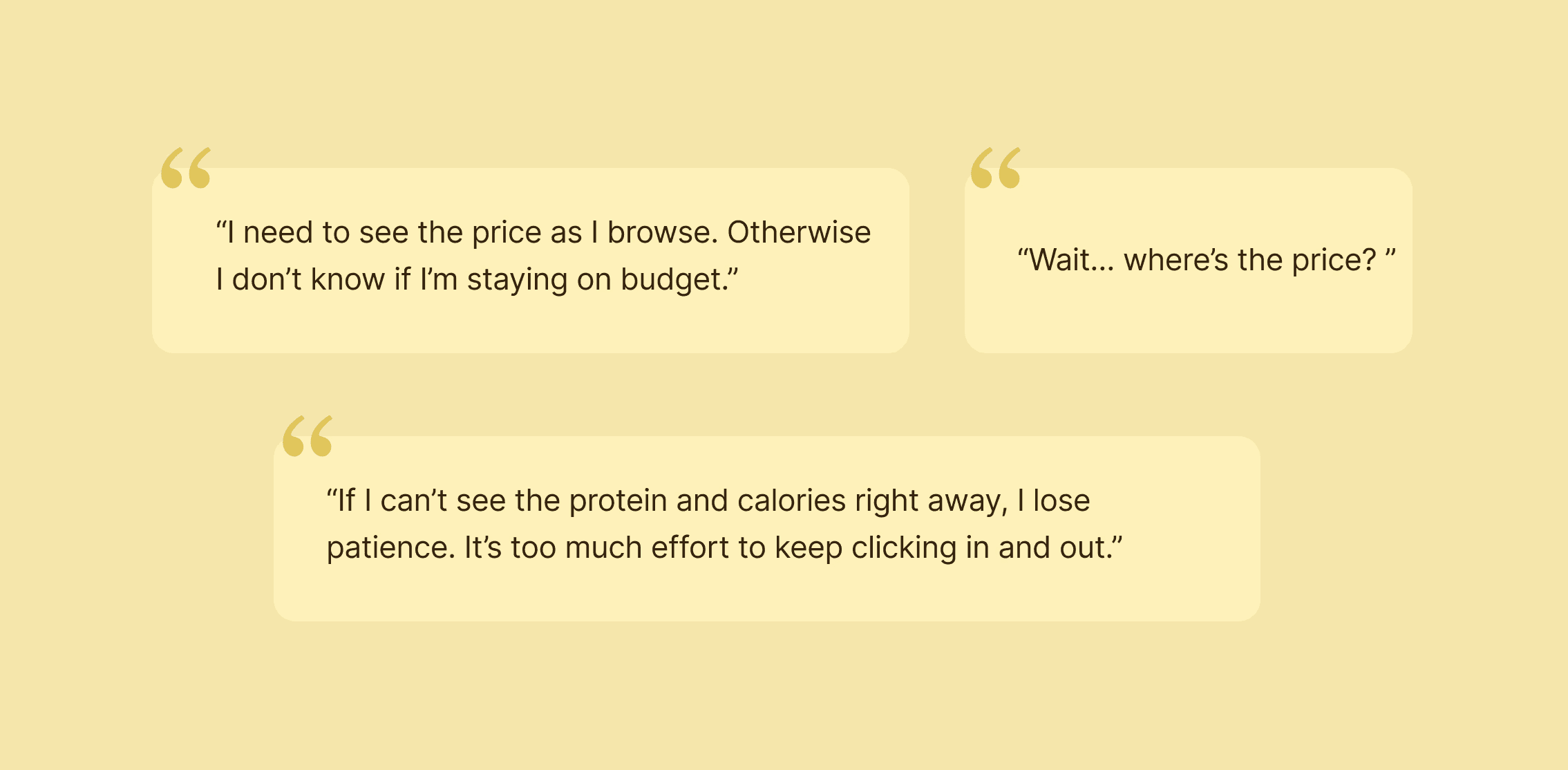
Nutrition macros and prices were not visible during meal browsing, forcing extra navigation and slowing decisions.
Recommendation 4:
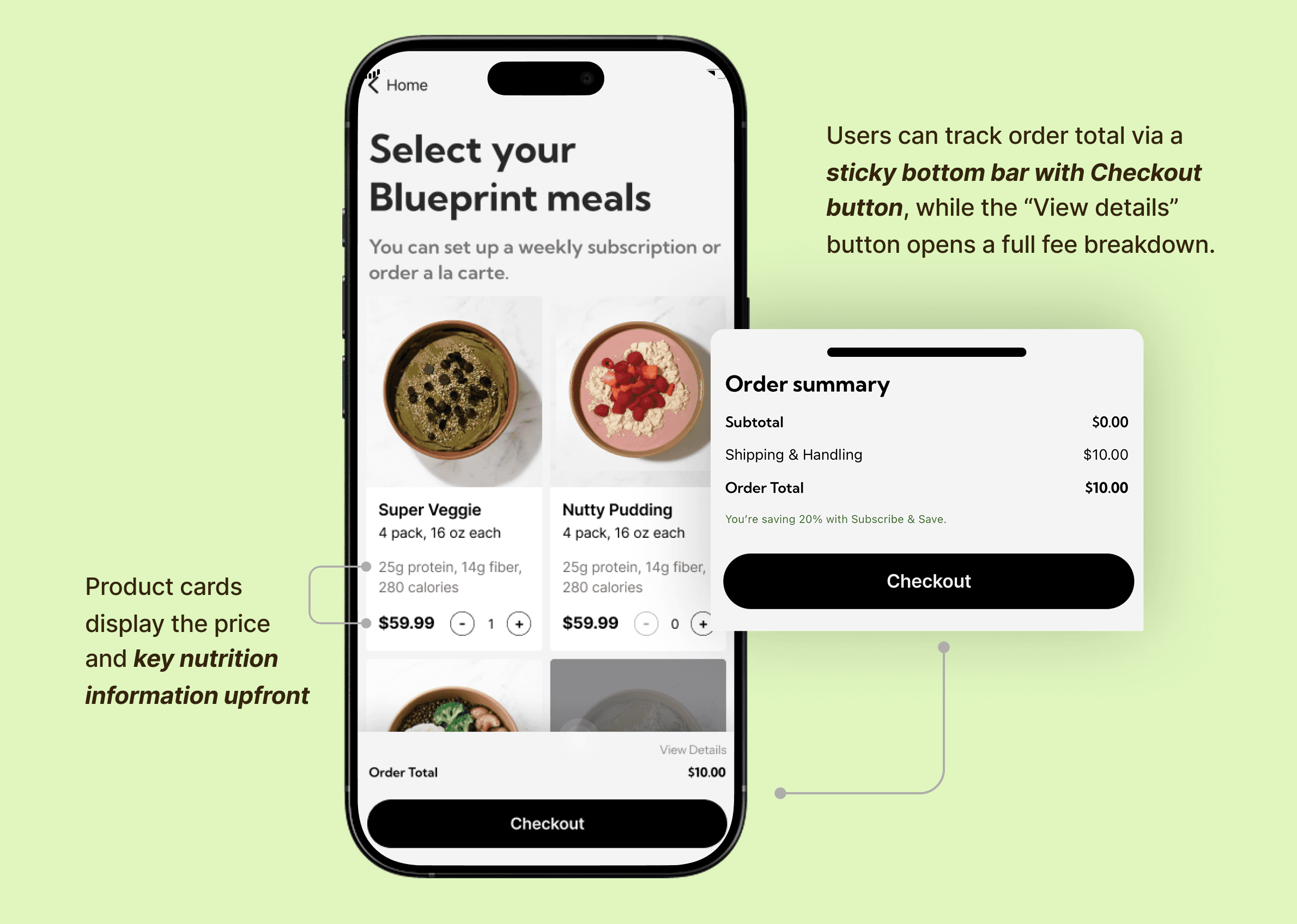
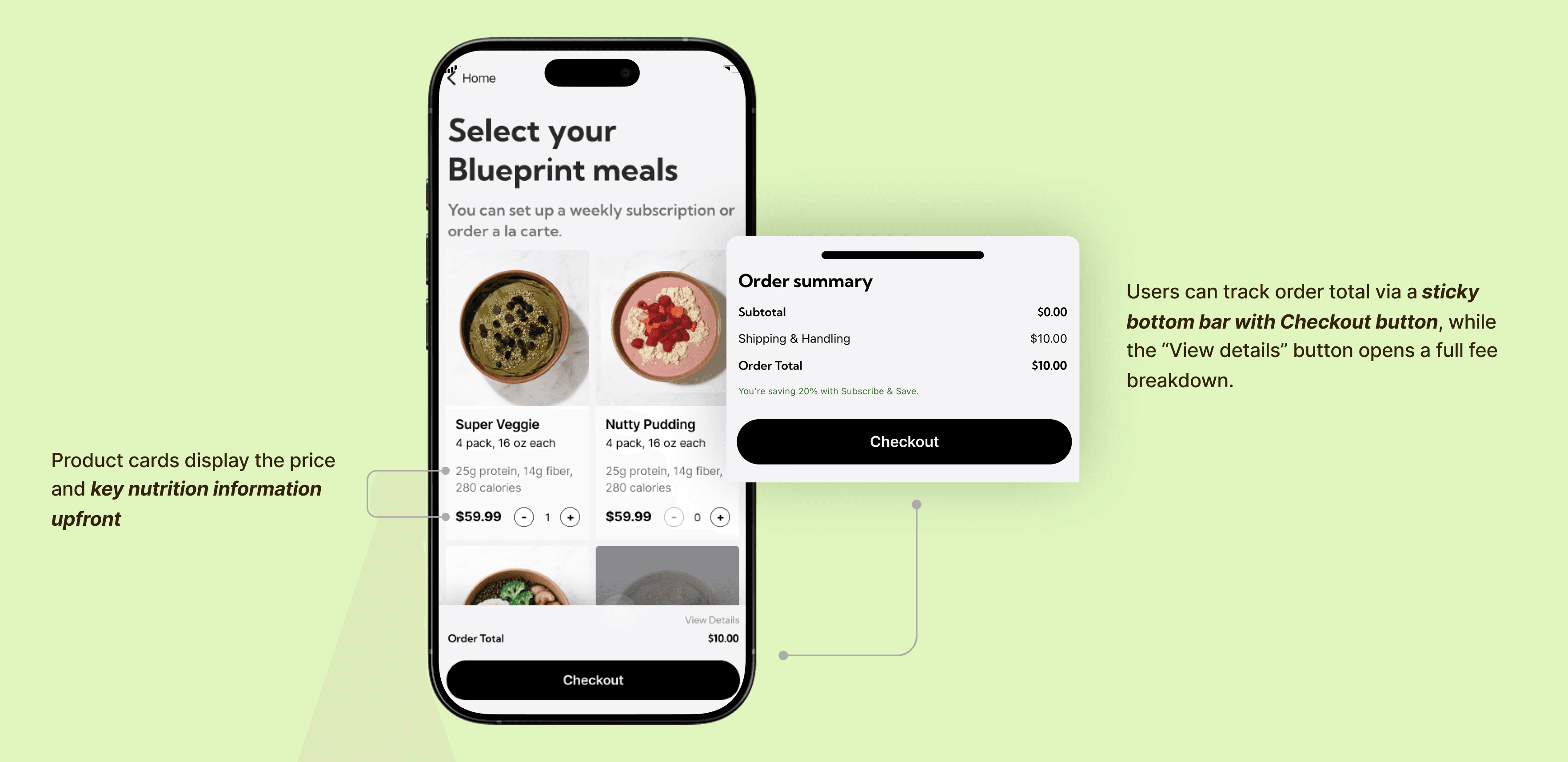
Presenting key information for confident purchase decision-making
Surface macros and pricing directly on meal cards and keep order totals visible throughout the flow.
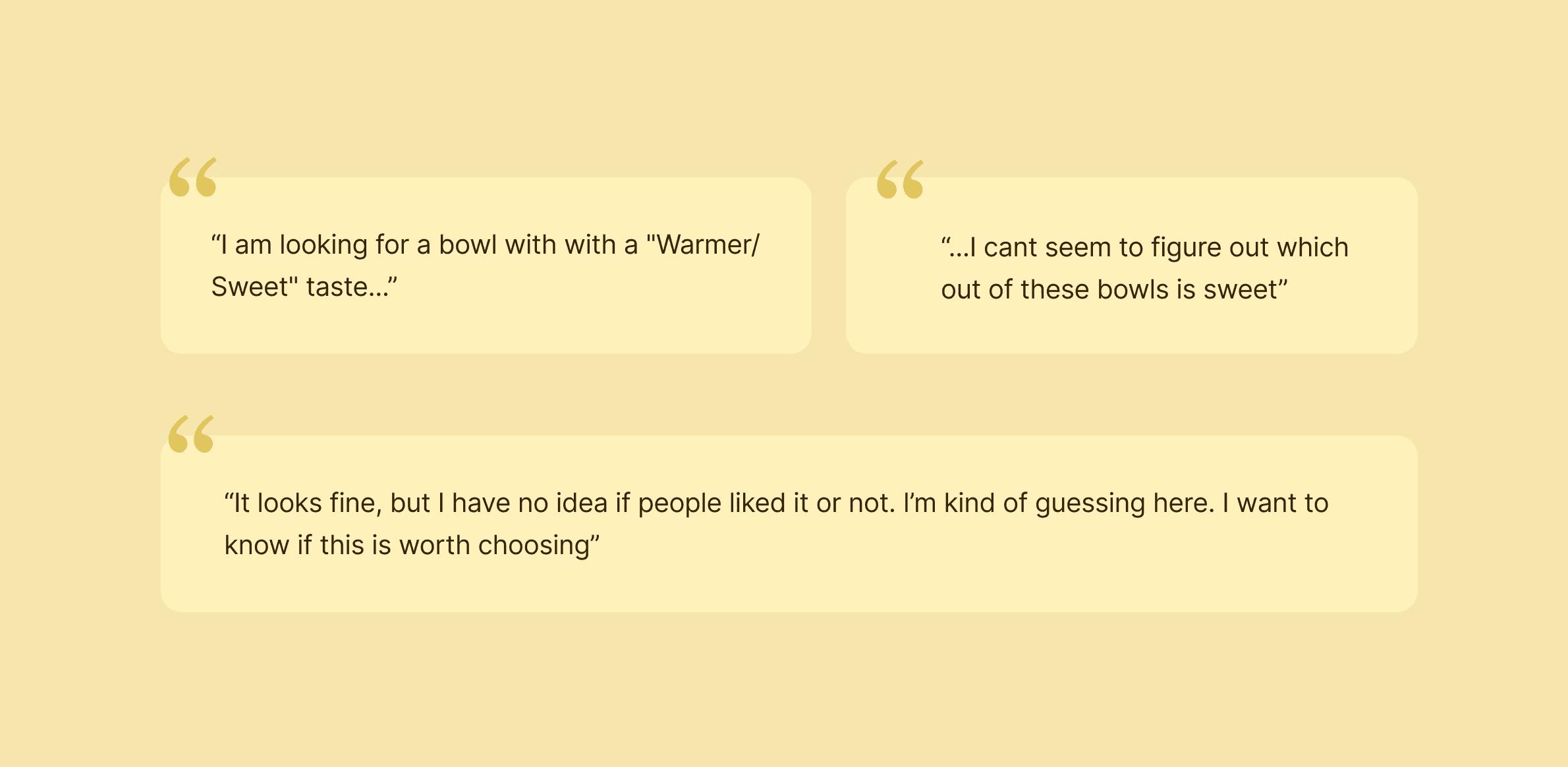
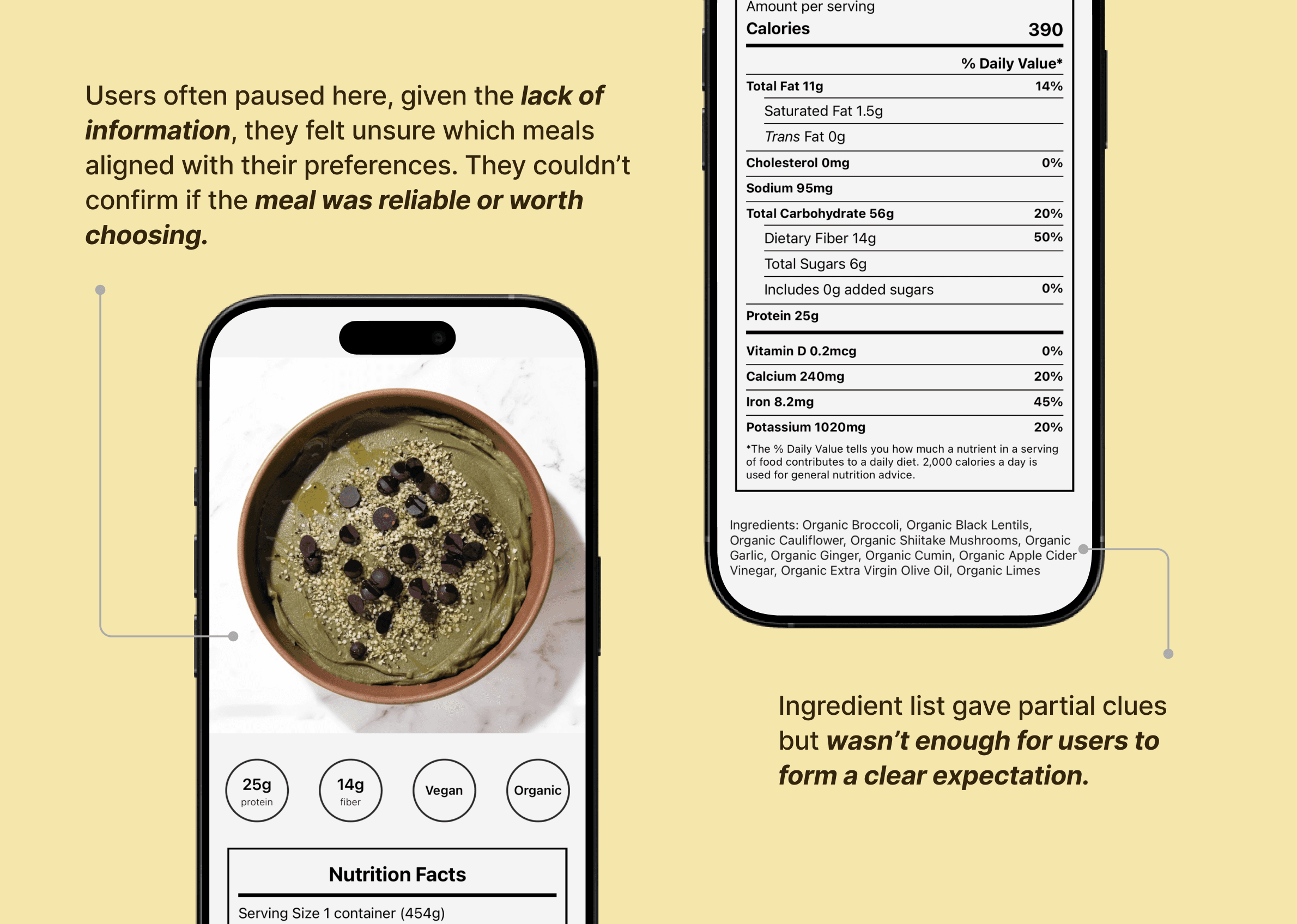
Finding 5:
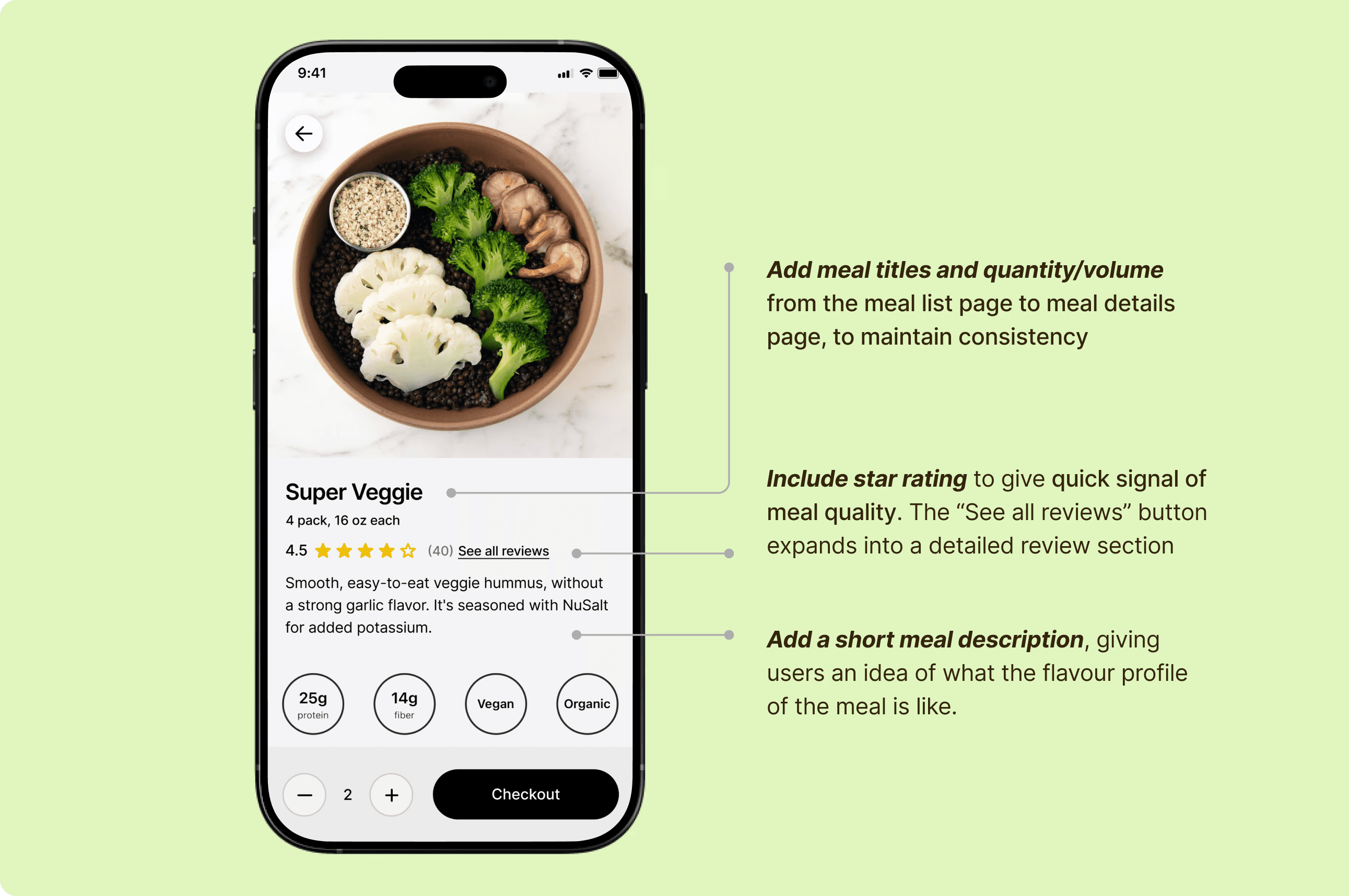
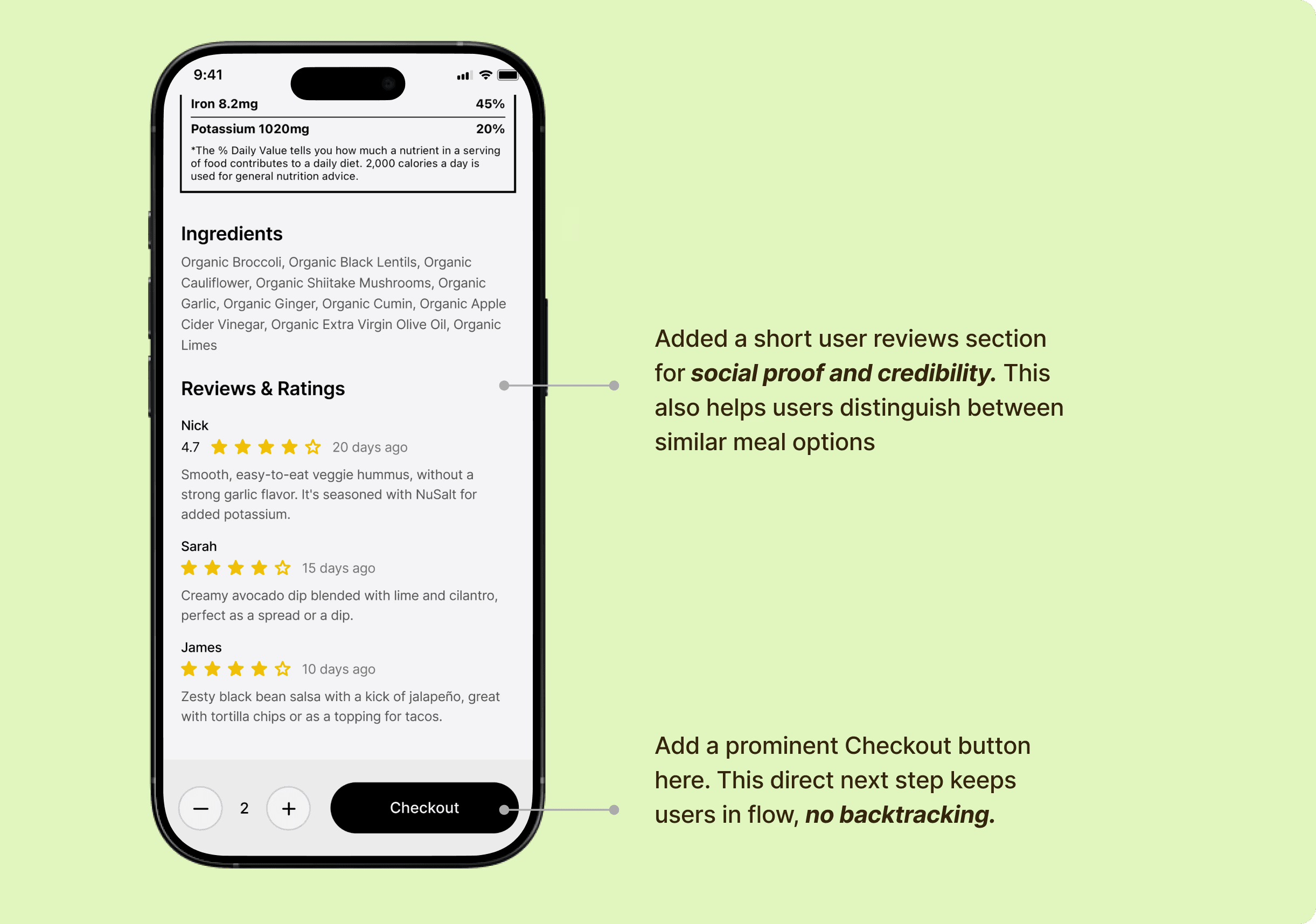
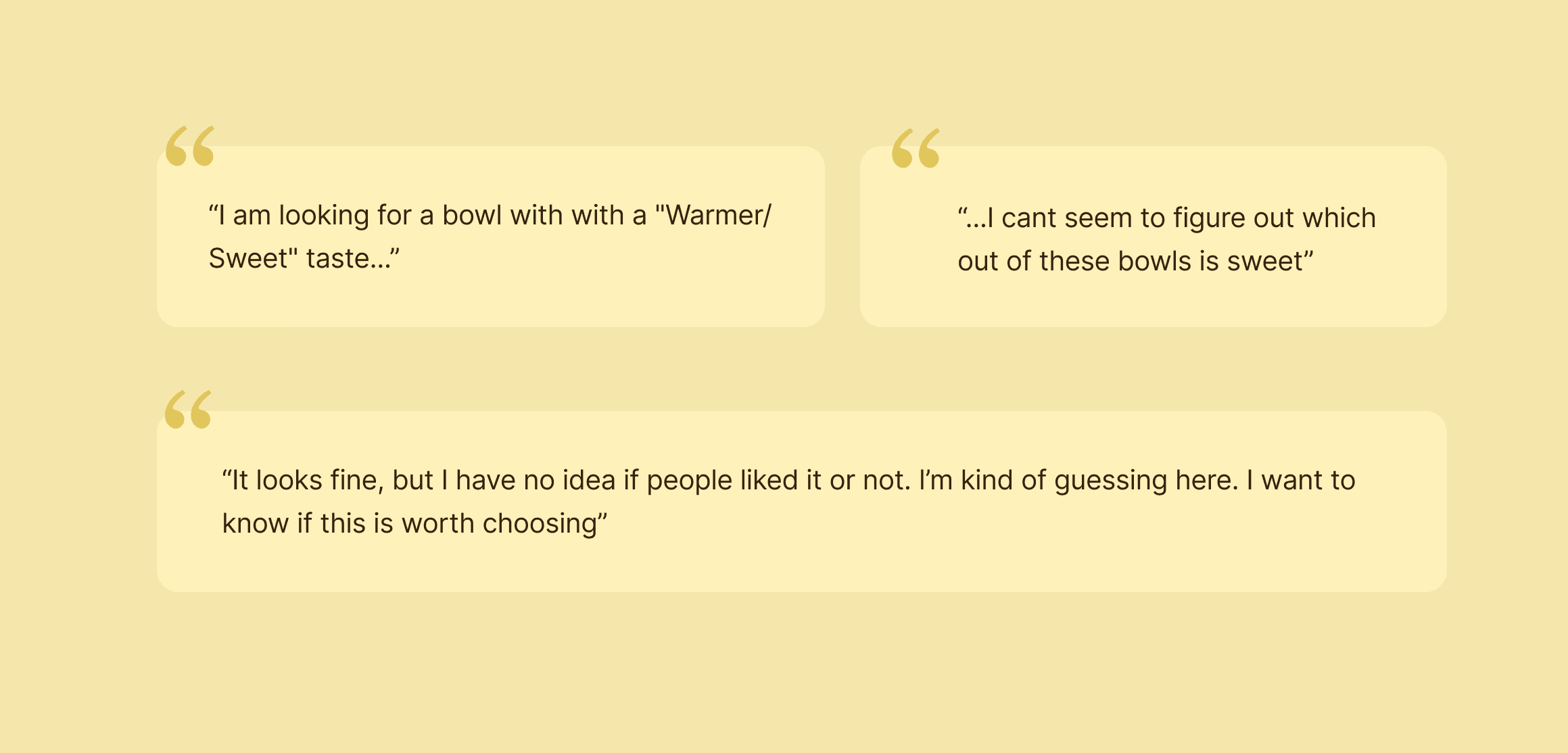
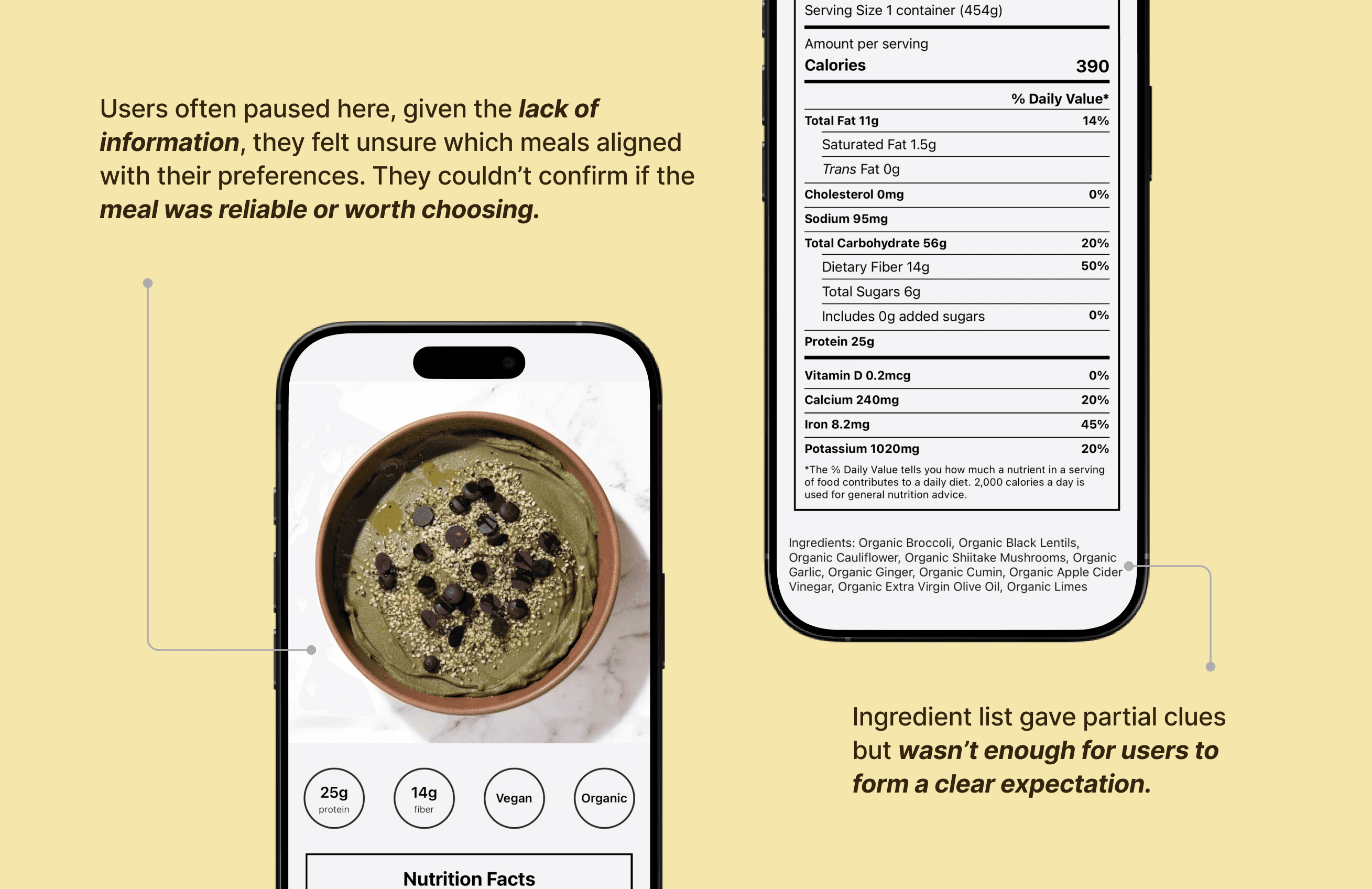
Meal details do not support confident decisions
The meal detail page lacked sensory descriptions, reassurance cues, and a clear next step, reducing momentum towards checkout.
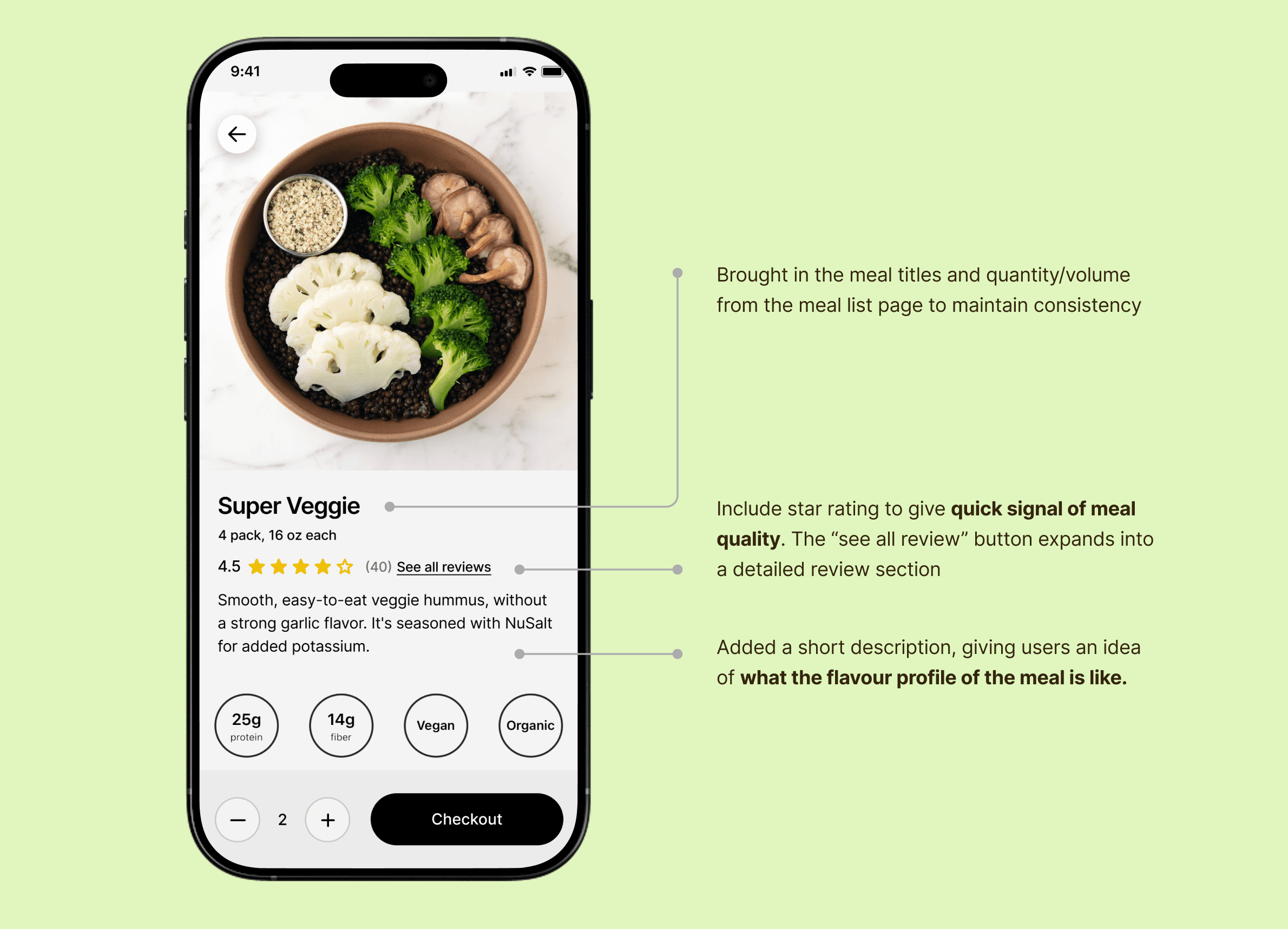
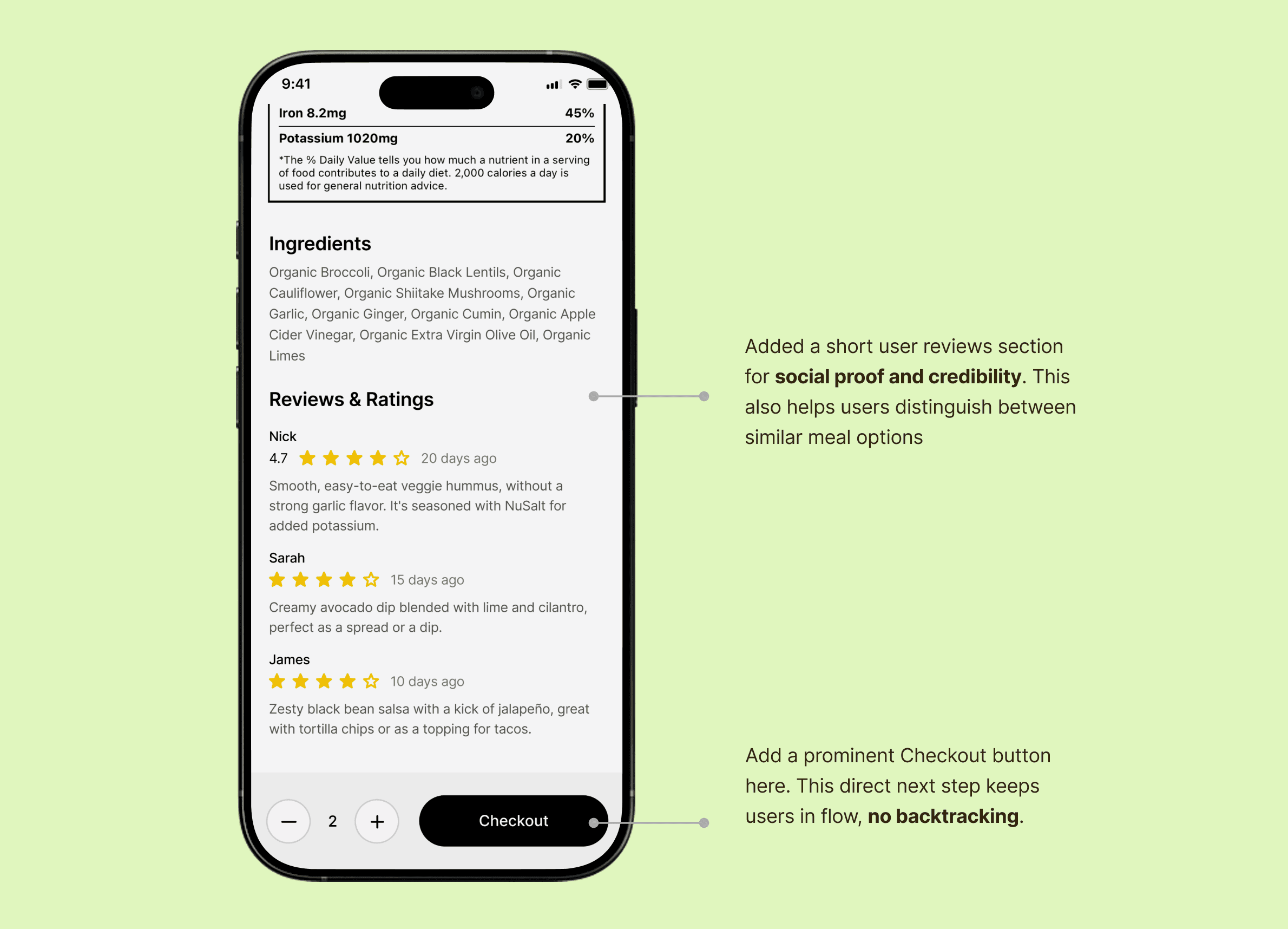
Recommendation 5:
Improvements to the meal details page to support a smoother purchase flow
Add taste and texture descriptions, supporting information, and a prominent path to checkout.
Result
Result
The recommendations were well received by the Superveggie team and aligned closely with their goal of understanding real user behavior. Usability testing showed that while both the Sleep and Eat features offered strong value, clarity gaps limited user confidence. With focused improvements, the app is well positioned to feel more intuitive, trustworthy, and actionable.
Positives & Strengths
Users valued the detailed interface and trusted the Apple Watch integration, showing strong motivation to act once insights were clear.
My Takeaway
In data-heavy products, clarity matters more than volume; insights only work when users immediately understand what to do next.
More Works
More Works
Enhancing Usability Across Sleep and Nutrition in Super Veggie
Role:
Project type:
Timeline:
Platform:
UX Researcher (Usability Testing & Synthesis)
Group client project (4 members)
6 weeks
iOS (Apple Watch–connected)
Overview
I led the creation of a unified design system that could scale across brands while allowing each to retain its personality. The result was a flexible, token-based system that streamlined development, improved brand coherence, and accelerated new product launches.
Sleep - an Apple Watch connected feature that analyzes nightly sleep data
Eat - a Blueprint aligned meal browsing and ordering experience
This case study focuses on improving the usability of Superveggie’s newly introduced Sleep feature while also evaluating how users browse and select meals. Through moderated usability testing with Apple Watch users, we identified key friction points that prevented users from fully understanding their sleep data and confidently making meal decisions, and offered relevant design recommendations to address these gaps.
The Problem
Super Veggie offers powerful sleep and nutrition tools, but users struggle to understand and act on them due to high cognitive load, unclear context, and limited visibility of key information. As a result, both new and returning users face friction during onboarding, sleep interpretation, and meal decision-making.
Our aim was to uncover opportunities that make each feature feel clear, intuitive, and simple to use on its own.
Project Timeline
Research Goals
GOAL 1
Assess how easily users can connect to and interpret the Sleep feature.
GOAL 2
Evaluate the clarity, effort, and usefulness of the onboarding sleep survey.
GOAL 3
Understand users’ mental models and comprehension of sleep analytics.
GOAL 4
Identify user expectations for actionable insights and lifestyle recommendations
GOAL 5
Measure the ease of navigating and understanding the Eat feature.
GOAL 6
Determine overall satisfaction and how well the app aligns with user needs and behaviors.
User Testing
Methodology
Conducted moderated remote usability testing to evaluate the Sleep and Eat features of the Superveggie app, with a primary focus on the newly introduced Sleep experience. Because the Sleep feature pulls data directly from Apple Health, the study was limited to Apple Watch users to ensure all testing reflected real, personal sleep data rather than simulated content.
8 moderated remote sessions
45- 60 mins each session
2 interviews scripts
Task-based +
think-aloud method
Participants
8 participants were drawn from two distinct sources:
Existing Users (Provided by Client)
Participants had already interacted with earlier app versions, enabling us to evaluate how well they interpreted new additions.
New Users (Screened and recruited via Private Panels)
Participants had no prior experience with Super Veggie, enabling us to capture first-time impressions
New recruited users were screened for:
Own and use an Apple Watch
Track (or have tracked) sleep using Apple Health
Active interest in improving health or daily habits
Procedure, Data Collection and Analysis
Each usability session was conducted by 2 researchers and one participant at a time. One researcher moderated the session, guiding the participant through tasks and follow-up questions, while the second researcher documented observations and timestamps.
The structure of each session included:
Pre-test Questionnaire
Task Completion
Post-task
Questionnaire
Data Organisation
& Analysis
We Collected:
Screen and audio recordings
Moderator notes
Questionnaire responses
Pre-test Questionnaire
Task Completion
Post-task
Questionnaire
Data Organisation
& Analysis
Findings & Recommendations
SLEEP
Finding 1:
Overwhelming sleep on-boarding survey
Users described the sleep survey as overwhelming and mentally taxing. Open-ended questions, large blocks of text, and a hidden skip option made the experience feel longer than expected.
Recommendation 1:
Create a more user-friendly, low-friction survey experience
Break the survey into shorter steps, reduce typing with structured inputs, and surface a visible skip option to lower effort, improve completion and prevent bounce offs.
Finding 2:
Sleep data is hard to interpret without context or visual clarity
Users struggled to understand their sleep score, interpret individual sleep metrics like REM, Deep Sleep, SpO2, and correctly read visual indicators. The sleep graph felt visually disconnected.
Recommendation 2:
Clarify sleep insights through context and visual refinements
Provide immediate context through personalized messaging, add clear explanations for each sleep metric, refine visual indicators to clearly distinguish actual performance from ideal ranges and use a more connected and intuitive graph.
EAT
Finding 3:
Blueprint Context Is Missing for New Users
Non-Blueprint users lacked clarity on who Bryant Johnson is and how the protocol relates to their experience.
Recommendation 3:
Provide a clear introduction to Bryant Johnson and “Blueprint” meals
Introduce lightweight Blueprint context during onboarding and relevant touchpoints to build understanding and trust.
Finding 4:
Key Nutrition and Pricing Information Is Hidden
Nutrition macros and prices were not visible during meal browsing, forcing extra navigation and slowing decisions.
Recommendation 4:
Presenting key information for confident purchase decision-making
Surface macros and pricing directly on meal cards and keep order totals visible throughout the flow.
Finding 5:
Meal details do not support confident decisions
The meal detail page lacked sensory descriptions, reassurance cues, and a clear next step, reducing momentum towards checkout.
Recommendation 5:
Improvements to the meal details page to support a smoother purchase flow
Add taste and texture descriptions, supporting information, and a prominent path to checkout.
Result
The recommendations were well received by the Superveggie team and aligned closely with their goal of understanding real user behavior. Usability testing showed that while both the Sleep and Eat features offered strong value, clarity gaps limited user confidence. With focused improvements, the app is well positioned to feel more intuitive, trustworthy, and actionable.
Positives & Strengths
Users valued the detailed interface and trusted the Apple Watch integration, showing strong motivation to act once insights were clear.
My Takeaway
In data-heavy products, clarity matters more than volume; insights only work when users immediately understand what to do next.
More Works
Enhancing Usability Across Sleep and Nutrition in Super Veggie
Role:
Project type:
Timeline:
Platform:
UX Researcher (Usability Testing & Synthesis)
Group client project (4 members)
6 weeks
iOS (Apple Watch–connected)
Overview
I led the creation of a unified design system that could scale across brands while allowing each to retain its personality. The result was a flexible, token-based system that streamlined development, improved brand coherence, and accelerated new product launches.
Sleep - an Apple Watch connected feature that analyzes nightly sleep data
Eat - a Blueprint aligned meal browsing and ordering experience
This case study focuses on improving the usability of Superveggie’s newly introduced Sleep feature while also evaluating how users browse and select meals. Through moderated usability testing with Apple Watch users, we identified key friction points that prevented users from fully understanding their sleep data and confidently making meal decisions, and offered relevant design recommendations to address these gaps.
The Problem
Super Veggie offers powerful sleep and nutrition tools, but users struggle to understand and act on them due to high cognitive load, unclear context, and limited visibility of key information. As a result, both new and returning users face friction during onboarding, sleep interpretation, and meal decision-making.
Our aim was to uncover opportunities that make each feature feel clear, intuitive, and simple to use on its own.
Project Timeline
Research Goals
GOAL 1
Assess how easily users can connect to and interpret the Sleep feature.
GOAL 2
Evaluate the clarity, effort, and usefulness of the onboarding sleep survey.
GOAL 3
Understand users’ mental models and comprehension of sleep analytics.
GOAL 4
Identify user expectations for actionable insights and lifestyle recommendations.
GOAL 5
Measure the ease of navigating and understanding the Eat feature.
GOAL 6
Determine overall satisfaction and how well the app aligns with user needs and behaviors.
User Testing
Methodology
Conducted moderated remote usability testing to evaluate the Sleep and Eat features of the Superveggie app, with a primary focus on the newly introduced Sleep experience. Because the Sleep feature pulls data directly from Apple Health, the study was limited to Apple Watch users to ensure all testing reflected real, personal sleep data rather than simulated content.
8 moderated remote sessions
45- 60 mins each session
2 interviews scripts
Task-based + think-aloud method
Participants
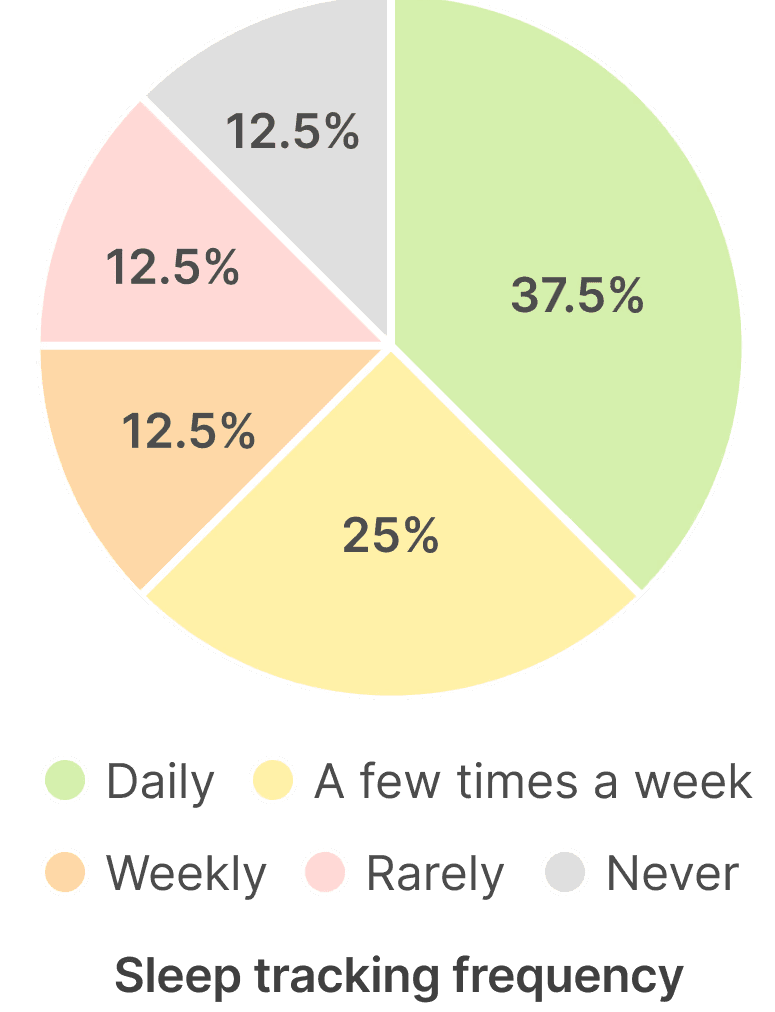
8 participants were drawn from two distinct sources:
Existing Users (Provided by Client)
Participants had already interacted with earlier app versions, enabling us to evaluate how well they interpreted new additions.
New Users (Screened and recruited via Private Panels)
Participants had no prior experience with Super Veggie, enabling us to capture first-time impressions
New recruited users were screened for:
Own and use an Apple Watch
Track (or have tracked) sleep using Apple Health
Active interest in improving health or daily habits
Procedure, Data Collection and Analysis
Each usability session was conducted by 2 researchers and one participant at a time. One researcher moderated the session, guiding the participant through tasks and follow-up questions, while the second researcher documented observations and timestamps.
The structure of each session included:
Pre-test Questionnaire
Task Completion
Post-task
Questionnaire
Data Organisation
& Analysis
We Collected:
Screen and audio recordings
Moderator notes
Questionnaire responses
Pre-test Questionnaire
Task Completion
Post-task
Questionnaire
Data Organisation
& Analysis
Findings & Recommendations
SLEEP
Finding 1:
Overwhelming sleep on-boarding survey
Users described the sleep survey as overwhelming and mentally taxing. Open-ended questions, large blocks of text, and a hidden skip option made the experience feel longer than expected.
Recommendation 1:
Create a more user-friendly, low-friction survey experience
Break the survey into shorter steps, reduce typing with structured inputs, and surface a visible skip option to lower effort, improve completion and prevent bounce offs.
Finding 2:
Sleep data is hard to interpret without context or visual clarity
Users struggled to understand their sleep score, interpret individual sleep metrics like REM, Deep Sleep, SpO2, and correctly read visual indicators. The sleep graph felt visually disconnected.
Recommendation 2:
Clarify sleep insights through context and visual refinements
Provide immediate context through personalized messaging, add clear explanations for each sleep metric, refine visual indicators to clearly distinguish actual performance from ideal ranges and use a more connected and intuitive graph.
EAT
Finding 3:
Blueprint Context Is Missing for New Users
Non-Blueprint users lacked clarity on who Bryant Johnson is and how the protocol relates to their experience.
Recommendation 3:
Provide a clear introduction to Bryant Johnson and “Blueprint” meals
Introduce lightweight Blueprint context during onboarding and relevant touchpoints to build understanding and trust.
Finding 4:
Key Nutrition and Pricing Information Is Hidden
Nutrition macros and prices were not visible during meal browsing, forcing extra navigation and slowing decisions.
Recommendation 4:
Presenting key information for confident purchase decision-making
Surface macros and pricing directly on meal cards and keep order totals visible throughout the flow.
Finding 5:
Meal details do not support confident decisions
The meal detail page lacked sensory descriptions, reassurance cues, and a clear next step, reducing momentum towards checkout.
Recommendation 5:
Improvements to the meal details page to support a smoother purchase flow
Add taste and texture descriptions, supporting information, and a prominent path to checkout.
Result
The recommendations were well received by the Superveggie team and aligned closely with their goal of understanding real user behavior. Usability testing showed that while both the Sleep and Eat features offered strong value, clarity gaps limited user confidence. With focused improvements, the app is well positioned to feel more intuitive, trustworthy, and actionable.
Positives & Strengths
Users valued the detailed interface and trusted the Apple Watch integration, showing strong motivation to act once insights were clear.
My Takeaway
In data-heavy products, clarity matters more than volume; insights only work when users immediately understand what to do next.
More Works